
Most cloud breaches aren’t hacks. They’re open doors you forgot to close.
Key Takeaways
- Vulnerabilities are code-level flaws (CVEs, zero-days). Misconfigurations are setup mistakes (public storage, default passwords).
- Gartner estimates 99% of cloud security failures come from misconfigurations — not software bugs.
- Misconfigurations are easier to exploit. No hacking skills required. A Google search can find an exposed S3 bucket.
- Shadow IT and cloud sprawl cause “configuration drift” — settings that slowly become unsafe as environments grow.
- The fix is a mix of automated audits (CSPM tools), least-privilege access, and shift-left security in your CI/CD pipeline.
The Open Door vs. The Broken Lock
Here’s the problem: most IT teams treat every cloud security issue the same way. A new CVE drops? Patch it. But what about the S3 bucket someone left public last Tuesday? That doesn’t show up in a CVE database. It shows up in a breach report.
Cloud environments are not static. Every new service spun up, every new developer onboarded, every shortcut taken under deadline pressure is a chance for a setting to go wrong. The confusion between misconfigurations and vulnerabilities is costing companies millions — not because they don’t care, but because they’re solving the wrong problem.
According to IBM’s 2025 Cost of a Data Breach Report, human error drives 26% of all data breaches — and most of that is configuration mistakes, not software bugs. The breach doesn’t happen because someone wrote bad code. It happens because someone checked the wrong box.
Misconfiguration vs. Vulnerability: Code vs. Configuration
These two terms get mixed up constantly. Here’s the clear difference:
A vulnerability is a flaw inside the software itself — a bug in the code, an outdated library, or a zero-day exploit. The famous Log4Shell bug (CVE-2021-44228) is a textbook example. It existed inside the Log4j library, and no amount of configuration changes would fix it. You had to patch the code.
A misconfiguration is a mistake in how your environment is set up — not the software itself. Think: a storage bucket left public, a default admin password never changed, or an IAM role with way too many permissions. As HBR describes it: “The front door is just left open.”
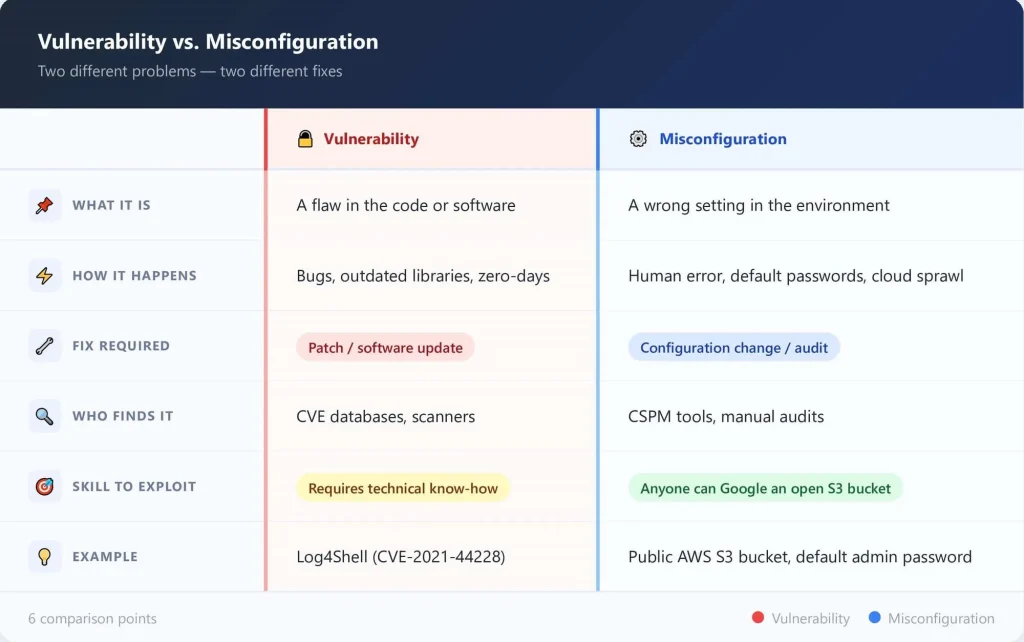
The key difference: a vulnerability needs a patch. A misconfiguration just needs someone to fix the setting — but first, someone has to find it.
Why Misconfigurations Are More Dangerous
You might think a vulnerability is the bigger threat. It’s not. Here’s why:
- You don’t need to be a skilled hacker to find an open S3 bucket. Search engines and free tools like GrayhatWarfare index publicly exposed cloud storage. Anyone can look.
- Vulnerabilities take time to exploit. Misconfigurations are instant. The attacker walks in — no lockpicking needed.
- Shadow IT makes it worse. When developers spin up environments outside IT’s view, those environments often skip security reviews. That’s how configuration drift happens — settings quietly become unsafe as cloud sprawl grows.
Real-world proof: Toyota exposed 260,000 customers’ data for eight years due to a single cloud misconfiguration. No vulnerability was exploited. The door was just left open. (Source: Spacelift Cloud Security Stats 2026)
The Strategy Shift: Moving Beyond Just Patching
Most security budgets are built around patch management. That makes sense for on-premises infrastructure. But in the cloud, it’s the wrong playbook.
The Shared Responsibility Model matters here. Cloud providers like AWS, Azure, and GCP secure the underlying infrastructure. But you are responsible for everything you configure inside it — permissions, storage access, network rules, and more. Most teams don’t fully understand this split, and that gap is where breaches happen.
Verizon’s Data Breach Investigation Report found that misconfigurations caused 10% of all breaches in 2020, with more than 39% of web applications affected. And that number keeps rising as cloud adoption accelerates. (Source: HBR / Trend Micro)
The fix isn’t to stop patching. It’s to give misconfiguration management equal weight in your security strategy.
Actionable Steps: Securing the Cloud Environment
Run automated configuration audits (CSPM tools)
Cloud Security Posture Management tools like Prisma Cloud, AWS Config, and Wiz continuously scan your environment for misconfigured resources. They catch what your team misses at 2 a.m. on a Tuesday.
Implement least-privilege access
Every user and service should only have access to what they absolutely need. Overly broad IAM roles are one of the top misconfigurations found in cloud environments — and they’re the easiest fix.
Shift-Left: check configurations in your CI/CD pipeline
Don’t wait until deployment to catch misconfigured infrastructure. Tools like Checkov and Terrascan scan Infrastructure-as-Code (IaC) files before anything reaches production. Catching a misconfiguration in development costs almost nothing. Catching it after a breach costs millions.
FAQs
How do I prevent AI tools from becoming shadow AI?
What is the difference between AI automation and adding more tools?
How quickly can we see ROI from AI security automation?
Should we build or buy AI security capabilities?
Conclusion
You can’t patch your way out of a bad configuration. Vulnerabilities and misconfigurations are two different problems requiring two different approaches — and treating them the same is what’s leaving most cloud environments exposed.
This is where Digital Security Teammates can help: by continuously monitoring configurations, correlating risks, and alerting your team before misconfigurations become breaches.