Key Takeaways
- Manual evidence collection is a major risk: automation can reduce manual evidence collection tasks by up to 60%, freeing your team for higher-value work.
- 83% of organizations conduct multiple audits separately each year, duplicating evidence and effort — automation solves this by mapping evidence across frameworks at once.
- Failing to comply with regulations adds an average of $174,538 to the cost of a data breach — continuous evidence collection keeps you ahead of that risk.
- Automated systems collect evidence continuously, not just before audits — so your compliance posture reflects reality, not a snapshot.
Introduction
Picture your security team two weeks before an audit. Engineers are pulling screenshots. Compliance leads are chasing ticket owners for logs. Someone’s rebuilding a spreadsheet that was “definitely saved somewhere.” This is the reality for most teams still doing evidence collection by hand — and it’s costing them time, money, and sleep.
91% of mid-market organizations plan to increase cybersecurity budgets, with 69% citing compliance as a top investment driver. More frameworks, more controls, more auditors — and the same number of hours in a day. Automated evidence collection changes the equation. It pulls proof of compliance straight from your systems, stores it in one place, and keeps it current — no scrambling required.
What is Automated Evidence Collection?
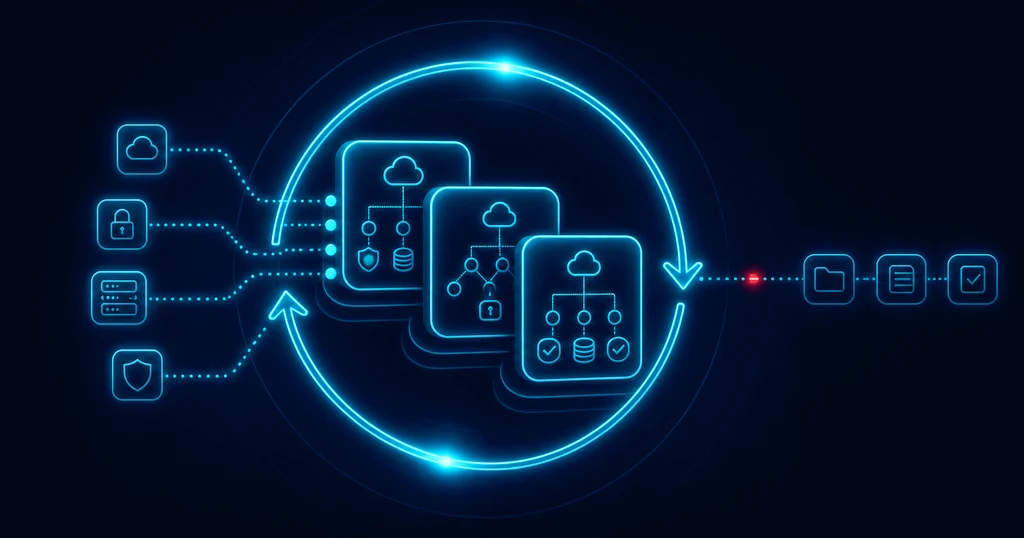
Automated evidence collection uses technology — integrations, APIs, and rule-based tests — to continuously gather, organize, and store the documentation that proves your controls are working. Instead of point-in-time screenshots or manual data pulls, evidence is collected directly from your source systems as controls operate.
How it works in practice:
- Connects to your tech stack — cloud providers, identity platforms, HR tools, ticketing systems, and code repositories
- Runs scheduled or continuous tests against your defined controls
- Flags gaps and failures so your team can fix issues before they become audit findings
- Stores everything in a centralized repository — organized, timestamped, and audit-ready
Automated evidence collection uses technology to streamline the process of gathering, organizing, and managing all compliance-related documentation, rather than relying on manual efforts, which are time-consuming and error-prone.
What Data Can You Gather with Automated Evidence Collection?
Evidence can include everything from policy documents to system logs — all of which are crucial for passing audits and demonstrating compliance. The right platform will pull from all of these sources without manual intervention.
Here’s what automated collection typically covers:
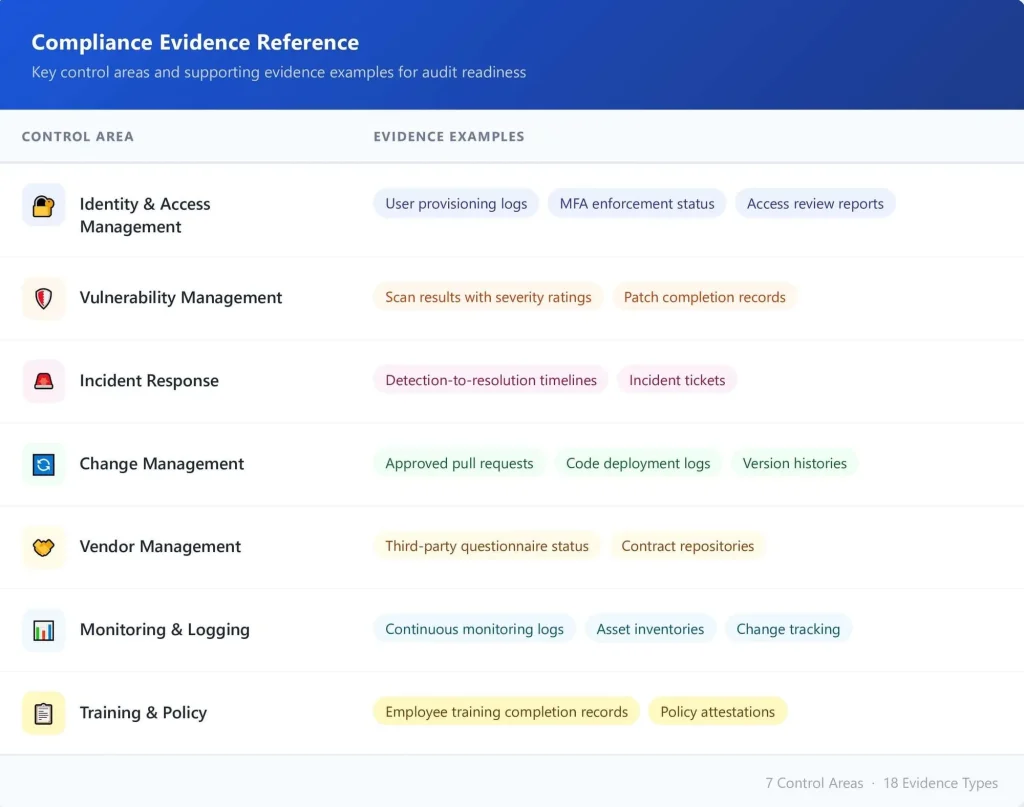
The deciding factor isn’t what’s technically possible to collect — it’s alignment. Evidence should map directly to the controls and frameworks your team is accountable for.
Why Do You Need Automation for Compliance and Governance?
Lack of continuous compliance can significantly slow down enterprise sales cycles, particularly when security questionnaires and compliance documentation are required before contract execution. That’s not just a compliance problem, it’s a revenue problem.
Manual processes can’t keep pace with modern compliance demands. In 2023, almost 70% of service organizations needed to demonstrate compliance or conformity to at least six frameworks spanning information security and data privacy. Running that manually across six frameworks means six times the screenshots, six times the tracking, and six times the risk of human error.
Automation changes three things that matter to leadership
Audit readiness becomes continuous, not seasonal. Your team isn’t scrambling every six months. Evidence is collected and stored in real time, so auditors can review current documentation at any point. Human error drops significantly.
Traditional manual processes for gathering evidence are fraught with challenges: high labor costs, human error, and delayed reporting — which can pose significant risks during audits. Automated systems apply the same rules every time, with no missed fields or forgotten logs.
Your team gets time back. Companies can save significant time per audit cycle by automating compliance: With Secure.com, you can save 10 hours per week on compliance tasks, with 90% reduction in audit preparation time. This frees up valuable engineering and security team resources to focus on strategic initiatives rather than administrative compliance work.
Beyond efficiency, the stakes are clear: the 2024 global average breach cost was $4.44 million (per IBM Cost of a Data Breach Report 2024). Non-compliance penalties stack on top of that. Continuous evidence collection is how you prove controls are working before regulators or auditors have to ask.
What are the Challenges of Automated Evidence Collection?
Integration complexity: Every system in your stack has a different API, data format, and configuration requirement. Connecting your cloud provider, identity platform, HR system, and ticketing tool takes real technical effort — especially for legacy systems with limited interoperability.
Data volume management: Automated systems collect a lot. Without structured dashboards and clear workflows, high evidence volumes become noise rather than signal. Teams need purpose-built views to make data actionable.
Alert fatigue: If every minor test failure triggers a notification, teams stop paying attention. Configuration matters — alerts should surface issues that actually affect your risk posture, not every low-severity event.
Accountability gaps: Human oversight is necessary even with automated evidence collection. Teams need defined roles and ownership for managing alerts, responding to issues, and reviewing evidence. Without clear accountability, critical findings can slip through the cracks — turning automation into a false sense of security.
Format inconsistency: Different systems export data in different formats. Before evidence can be evaluated against a control, it often needs to be standardized — a step that doesn’t always happen automatically.
What are the Best Practices for Automated Evidence Collection?
Map your integrations before you start: Identify every system that generates compliance-relevant data — cloud providers, identity tools, code repositories, HR platforms — and confirm how each connects to your automation tool. Start with the highest-volume, highest-risk sources.
Assign clear owners to every control area: Automation flags the problem; humans have to fix it. Each alert and evidence gap should have a named owner and an escalation path. Without this, issues sit unresolved.
Configure alerts by risk level: Not every failed test needs immediate action. Build alert logic that prioritizes high-severity findings (e.g., critical vulnerabilities on internet-facing assets, failed MFA enforcement) and routes lower-priority items (e.g., documentation gaps, low-risk config drift) to a review queue. This prevents alert fatigue while keeping your team focused on real risk.
Cross-map evidence across frameworks: A single security configuration — like encryption requirements — might satisfy controls across multiple regulatory frameworks. Automation platforms recognize these overlaps, reducing redundant work and providing a unified view of compliance across all applicable standards.
Review your automation regularly: Controls evolve, frameworks update, and system configurations drift. Schedule quarterly reviews of your automated tests to catch coverage gaps before an auditor does.
Train your team on the platform: Evidence collection automation is only useful if the people reviewing output understand what they’re looking at. Run onboarding for new team members and refresh training when the platform adds new features.
How Can Secure.com Help You in Automated Evidence Collection?
Continuous control monitoring: Secure.com runs automated tests across your environment on a continuous basis — not just before audits. When a control drifts or a test fails, your team is alerted in real time with the context to act fast.
Deep integrations with your stack: The platform connects directly to your cloud providers (AWS, Azure, GCP), identity tools (Okta, Azure AD), HR systems, ticketing platforms, and code repositories. Evidence is pulled from the source — no manual exports required.
Centralized evidence repository: Every piece of collected evidence is stored in one place, timestamped, and mapped to the relevant control and framework. Auditors get a single, organized view. Your team gets a single source of truth — no more ‘I think it’s in this folder’ moments.
Multi-framework cross-mapping: If your organization is pursuing SOC 2 and ISO 27001 at the same time, Secure.com maps overlapping controls automatically. One piece of evidence can satisfy requirements across multiple frameworks — reducing duplicate work across audit cycles.
Role-based access and accountability: Assign evidence owners, reviewers, and approvers within the platform. Secure.com tracks who acted on what and when — creating an audit trail of your compliance operations, not just your systems.
Audit-ready reporting: When it’s time for an audit, your evidence is already organized and exportable. Secure.com generates audit packages that give assessors exactly what they need — reducing back-and-forth and shortening audit timelines.
Real-time compliance dashboard: Get a live view of your compliance posture across all active frameworks. See which controls are passing, which are failing, and which need attention — without running a report manually.
Conclusion
Manual evidence collection had its time. That time is over. Security teams running six-plus frameworks, multiple audits a year, and growing regulatory scrutiny cannot stay compliant with spreadsheets and screenshots.
Automated evidence collection turns compliance from a pre-audit fire drill into a continuous, managed workflow. It reduces error, cuts audit prep time, and gives leadership real visibility into control health — all year, not just audit season.
Secure.com gives your team the integrations, continuous monitoring, and centralized evidence management to stay audit-ready without burning out. Deploy in 30 minutes. See value immediately. The question isn’t whether to automate — it’s how fast you can get started.
Frequently Asked Questions
What’s the difference between automated and traditional manual evidence collection?
Which compliance frameworks support automated evidence collection?
Can one piece of evidence satisfy multiple frameworks at once?
How long does it take to set up automated evidence collection?
Is automated evidence collection enough to pass an audit on its own?
Note: While frameworks are increasingly technology-neutral, some high-level certifications like FedRAMP require specific government-mandated controls that may go beyond standard automation capabilities.