Who should care: Anyone running classic Outlook on Microsoft 365 Apps, Office LTSC 2021 or Office LTSC 2024.
What could go wrong: An attacker replays a stolen NTLMv2 hash and signs in as your user.
Do this: Push the November 10 Office update and block outbound SMB today.
Worth remembering: A 6.5 bug on CISA’s exploited list outranks a 9.8 nobody is using.
Introduction
CISA has confirmed attackers are exploiting an Outlook zero-day that leaks Windows login data. Microsoft patched CVE-2026-124194 on November 10. Federal agencies have until November 24 to fix it, and everyone else should move faster.
What Happened?
Microsoft fixed the Outlook zero-day in a November Patch Tuesday release covering more than 1,000 flaws. It was the only one already under attack, and it was not public before the patch.
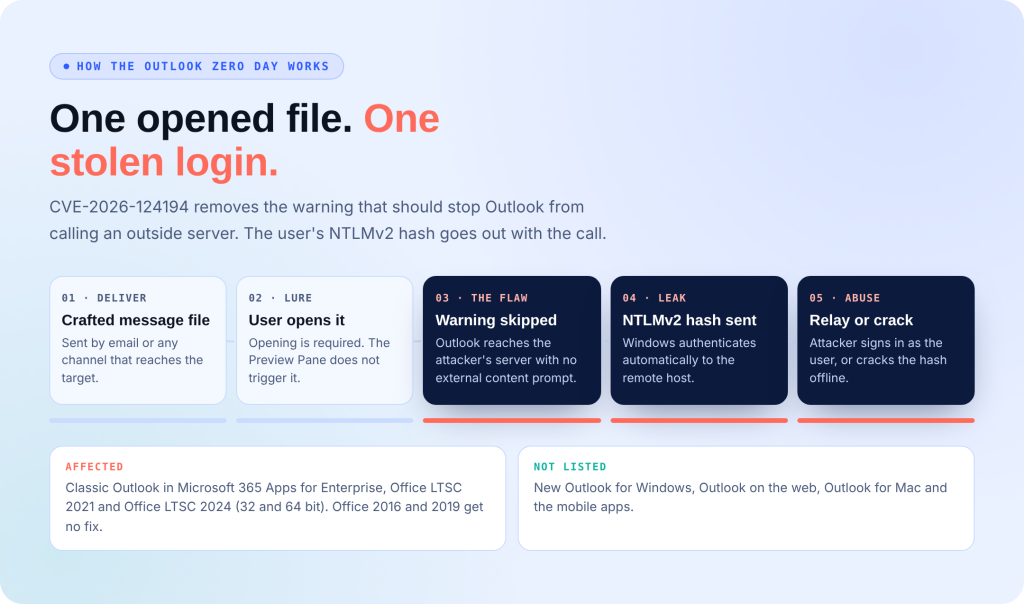
The attacker sends a crafted message file and talks the target into opening it. Outlook then connects to a server the attacker controls and skips the external content warning that should have stopped it. That connection hands over the user’s NTLMv2 hash. The Preview Pane does not trigger it; the victim must open the file.
CVE-2026-124194 removes the warning that should stop Outlook from calling an outside server. The user’s NTLMv2 hash goes out with the call.
Sent by email or any channel that reaches the target.
Opening is required. The Preview Pane does not trigger it.
Outlook reaches the attacker’s server with no external content prompt.
Windows authenticates automatically to the remote host.
Attacker signs in as the user, or cracks the hash offline.
What’s the Impact?
A stolen NTLMv2 hash lets an attacker sign in as the victim through a relay attack or crack it offline to recover the password. Microsoft rates the Outlook zero day Moderate at 6.5, which is how it slides down patch queues. Nobody has named the attackers or the victims.
Affected: Microsoft 365 Apps for Enterprise, Office LTSC 2021 (fixed in 16.0.14334.21048) and Office LTSC 2024 (fixed in 16.0.17932.21140), 32- and 64-bit. Office 2016 and 2019 left support in October 2025 and get no fixes. New Outlook, Outlook on the web, Mac, and mobile are not listed.
The fix for the Outlook zero day ships through Office updates. A machine that took the Windows update alone is still exposed.
Check the Office build, not the Windows build, before you close the ticket.
How to Avoid This
- Install the November 10 Office update. The fix ships through Office, not Windows Update.
- Block outbound TCP 445 and 139 to the internet, and stop the WebClient service if you don’t use WebDAV.
- Set the “Restrict NTLM: Outgoing NTLM traffic to remote servers” policy to audit, then to deny with exceptions.
- Move admin accounts into Protected Users, and require SMB signing plus LDAP signing and channel binding.
- Hold external .msg and .oft attachments at the mail gateway until every machine is patched.
Indicators of Compromise (IOCs)
Microsoft and CISA have published no domains, IPs, or file hashes for the Outlook zero-day. Defenders are hunting behavior instead:
- NTLM Operational Event ID 8001 showing an external server name
- outlook.exe opening SMB connections (TCP 445 or 139) to public IPs
- rundll32.exe calling davclnt.dll,DavSetCookie (WebDAV over 80/443)
- outlook.exe launched with a .msg or .oft file on the command line
- Security Event 4624, logon type 3, NTLM, from a source the account has never used
MITRE ATT&CK: T1187, Forced Authentication.
The Outlook zero day leaks NTLMv2 hashes when a user opens a crafted message file. These are the signals defenders are watching while the attackers stay unnamed.
Microsoft and CISA have published no domains, IPs or file hashes for this campaign. Treat the hits below as leads to investigate, not confirmed signatures.
Outgoing NTLM authentication. An external server name here is a direct sign of a leak.
Outlook opening SMB or NetBIOS sessions to the internet. Egress should never allow this.
WebDAV fallback over TCP 80 / 443 when the WebClient service is running.
Outlook launched to open a standalone message file, especially from Downloads.
External .msg and .oft attachments landing here around the time of an outbound NTLM event.
NTLM logons from sources the account has never used, plus new device sign ins or MFA changes nobody asked for.
Your Patch Queue Is Sorted by the Wrong Number
CVSS put this bug mid pile. Attackers put it on top. Secure.com’s AI teammates work from exploitation evidence, inside rules your team sets:
- Pull CISA KEV daily and push any listed CVE in your estate to the front, whatever its score
- Find every Outlook install still on a vulnerable Office build, including forgotten 2016 and 2019 machines
- Attack your own egress to prove SMB really is blocked, then flag the gaps
- Watch for NTLM logons from new sources after a user opens a suspicious file
- Draft patch tickets with the evidence attached, ready for your team to approve
Attack. Harden. Prove. Repeat.