SCKit Malware Hit 288 ScreenConnect Endpoints in 90 Minutes
- Who should care: MSPs, internal IT teams, and any business that manages machines through ScreenConnect.
- What could go wrong: One infected endpoint hands an attacker your technician’s session, and that session reaches every client.
- Do this: Check Run Command and Toolbox history today, and stop opening ScreenConnect sessions to hosts you suspect.
- Worth remembering: The attacker never needed a password. A blank extension key did the job.
Someone pushed SCKit malware to 288 machines across 48 organizations in about 90 minutes, using the remote support tool MSPs trust most. The toolkit was then built to sit and wait for the technician who logs in to help.
What Happened?
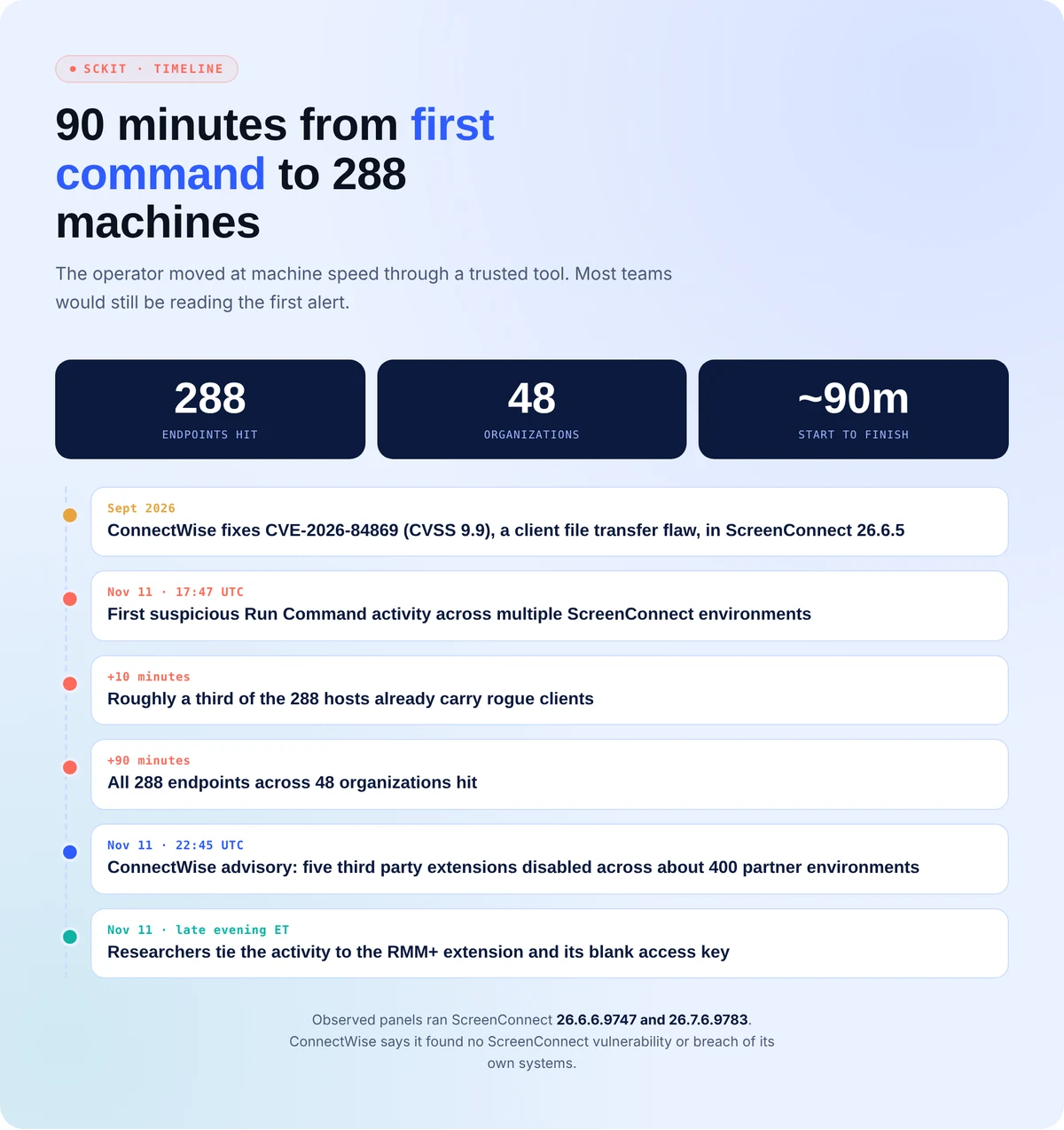
Huntress spotted the activity at 17:47 UTC on November 11. Roughly a third of the hosts fell in the first 10 minutes.
The operator used ScreenConnect’s Run Command feature to execute commands as SYSTEM across whole groups of endpoints. Each one downloaded a rogue installer (sc.msi) and a dropper called sckit-run.bat. The dropper pulled the SCKit malware: 16 PowerShell, batch, and config files, encrypted separately for every machine using its Windows UUID.
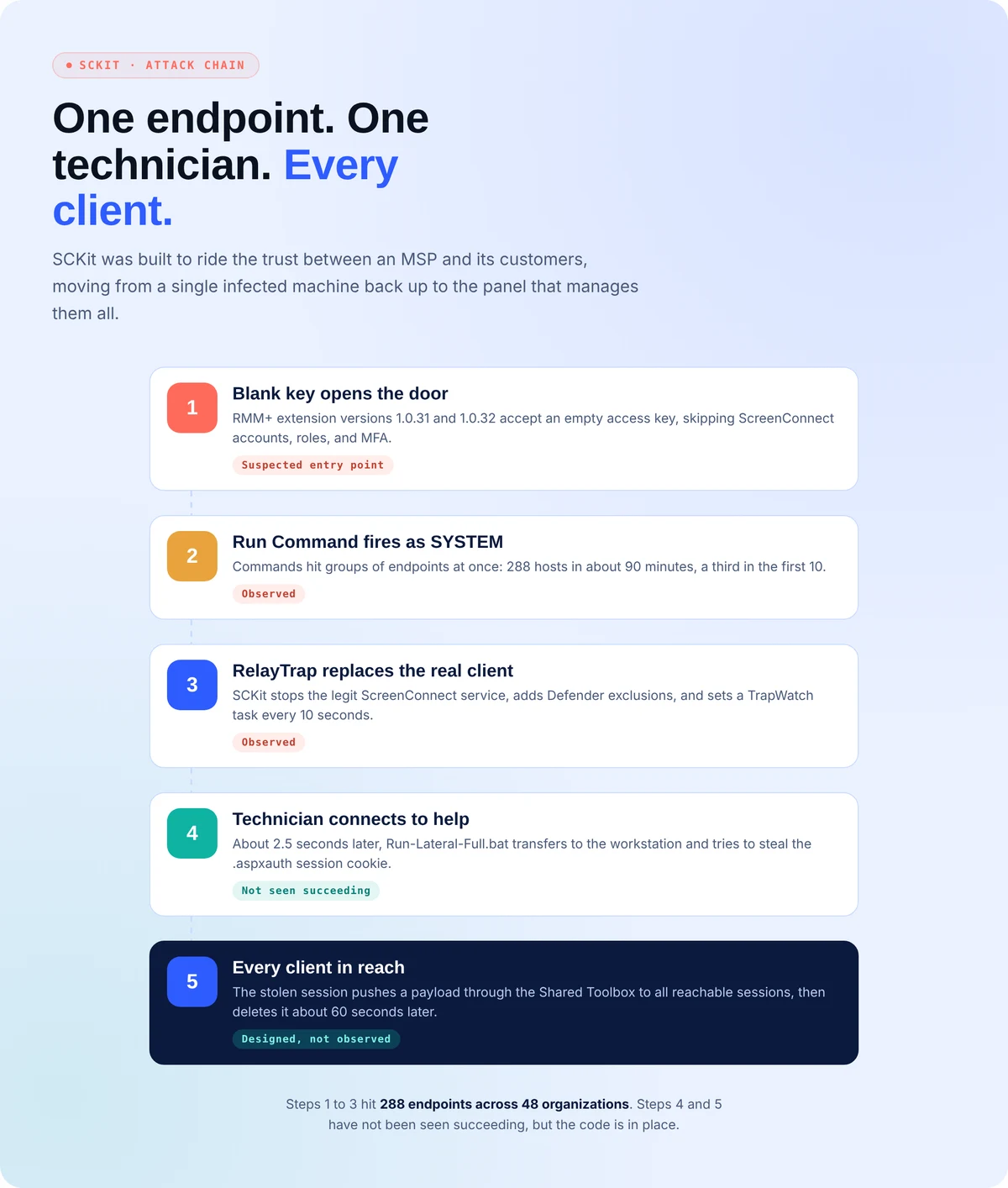
The likely way in was RMM+, a third-party extension. Versions 1.0.31 and 1.0.32 accepted a blank access key, skipping ScreenConnect accounts, roles, and MFA entirely. ConnectWise disabled five extensions across about 400 partner environments and says it found no flaw in ScreenConnect itself. It is the same lesson as the recent RMM server flaws: the management layer is the target.
What’s the Impact?
Once installed, SCKit malware stops the real ScreenConnect service, slots in an attacker copy, and adds Defender exclusions. When a technician connects, it tries to steal their session cookie, replay it against the panel, and push a payload to every reachable client through the Shared Toolbox.
That last step hasn’t been seen working. Yet.
The spread leans on CVE-2026-84869, a file transfer flaw (CVSS 9.9) fixed in ScreenConnect 26.6.5. Unpatched technician workstations are the soft spot, and as with incomplete patches on other RMM platforms, a fix only helps once it is installed everywhere.
How to Avoid SCKit Malware
- Review Run Command and Toolbox history for mass activity you didn’t start, and look for a second ScreenConnect client on endpoints.
- Disable RMM+ where you don’t need it and set a real access key everywhere else. Leave the extensions ConnectWise switched off turned off.
- Investigate suspect hosts with EDR live response or WinRM, never a ScreenConnect session.
- Remove the TrapWatch task, the RelayTrapLiteAlert Run key, C:\ProgramData\RelayTrap, and the rogue client. Keep hosts isolated until you confirm they’re clean, since reinfection has followed early release.
- From a clean device, end active sessions, rotate ScreenConnect credentials, and revoke identity provider tokens.
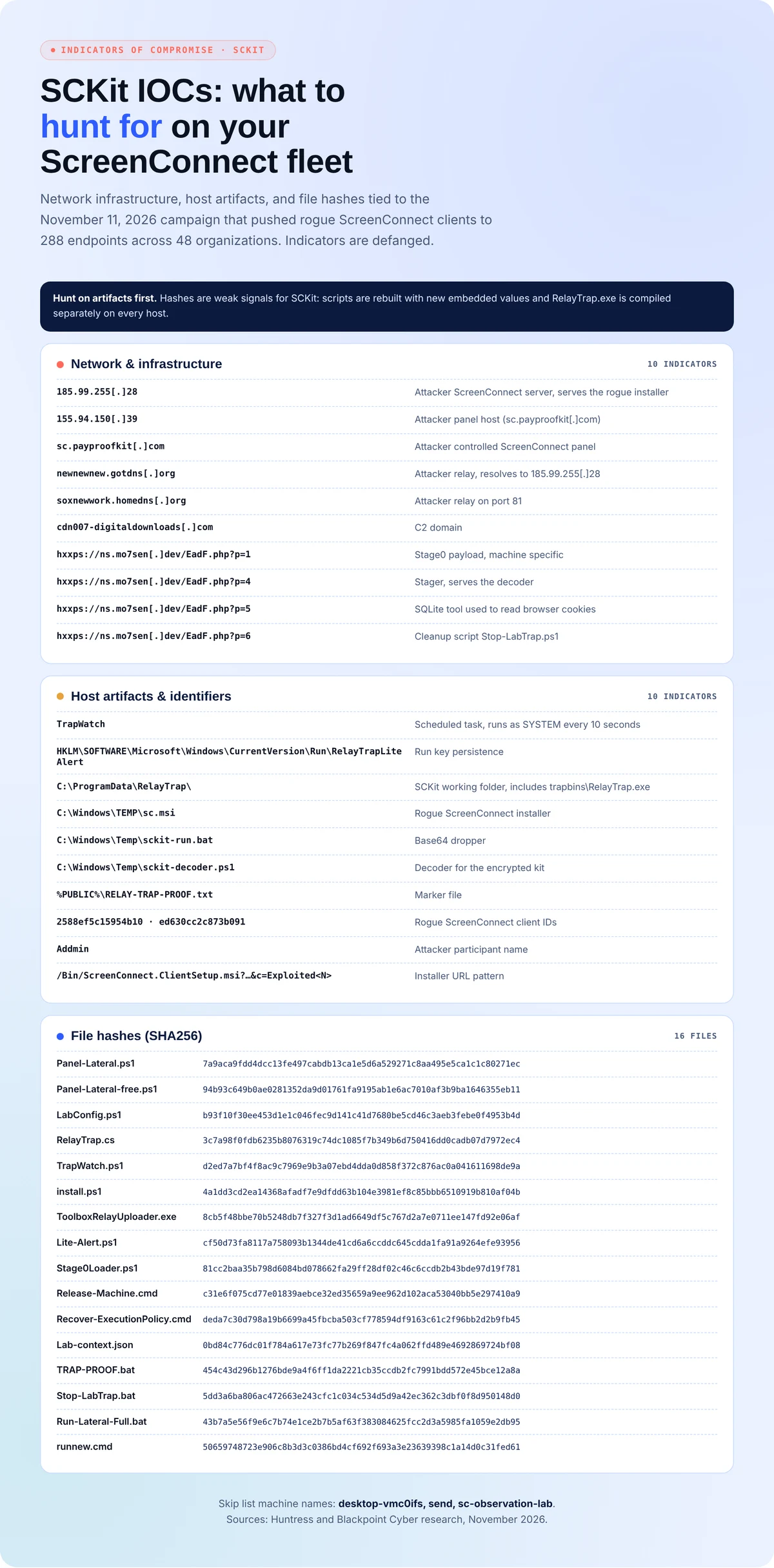
SCKit Malware Indicators of Compromise
File hashes are weak signals here. The scripts get rebuilt with new values and the trap binary is compiled on each host, so hunt on network and host artifacts first. The full list below comes from Huntress and GBHackers reporting.
Your RMM Has Admin Rights Everywhere. Attack It Before Someone Else Does.
SCKit didn’t break ScreenConnect. It walked through a trusted tool with a blank key and SYSTEM access to every client. Secure.com puts AI teammates on the offense against your own stack, so gaps like that land in your report instead of someone’s campaign.
- Attack: AI teammates probe RMM consoles, extensions, and exposed panels the way a real operator would.
- Harden: Findings like an unset access key or an unapproved remote client become fixes, routed under rules your team sets.
- Prove: Every action is logged and explained, so you can show clients exactly what changed and why.
- Repeat: Checks keep running, so a new plugin or skipped patch gets caught next cycle, not next breach.
- No more grunt work: Mass Run Command spikes and rogue installs get triaged automatically, and your analysts keep their evenings.