Top Strategies to Prevent Social Engineering Attacks
Social engineering bypasses your firewalls by targeting the most vulnerable part of your attack surface, your people.
Social engineering bypasses your firewalls by targeting the most vulnerable part of your attack surface, your people.
With 98% of cyberattacks involving social engineering tactics and losses reaching $2.77 billion in 2024, combined with the fact that the cloud provides users with a single credential that provides access to multiple resources in AWS, Azure, and SaaS platforms, it stands to reason that any compromise of social engineering techniques in a cloud environment increases the risk substantially.
Last Tuesday, a finance manager at a mid-sized SaaS company received an urgent Slack message from "the CFO." The profile photo matched. The writing style seemed right. The request came through the company's verified Slack workspace—immediate wire transfer approval needed for a time-sensitive acquisition.
She approved the $4.2 million transfer. By Wednesday morning, the money was gone. The "CFO" was a deepfake created by AI. The attackers spent three weeks mapping the organization's cloud attack surface: identifying key personnel through LinkedIn, documenting communication patterns from public GitHub repos, and discovering exposed Azure AD configurations. They didn't hack the firewall. They hacked the human.
A social engineering attack occurs when someone tricks you into giving up access instead of breaking through your defenses. The attacker doesn't need to exploit software vulnerabilities or bypass firewalls, they just need to manipulate the right person at the right time.
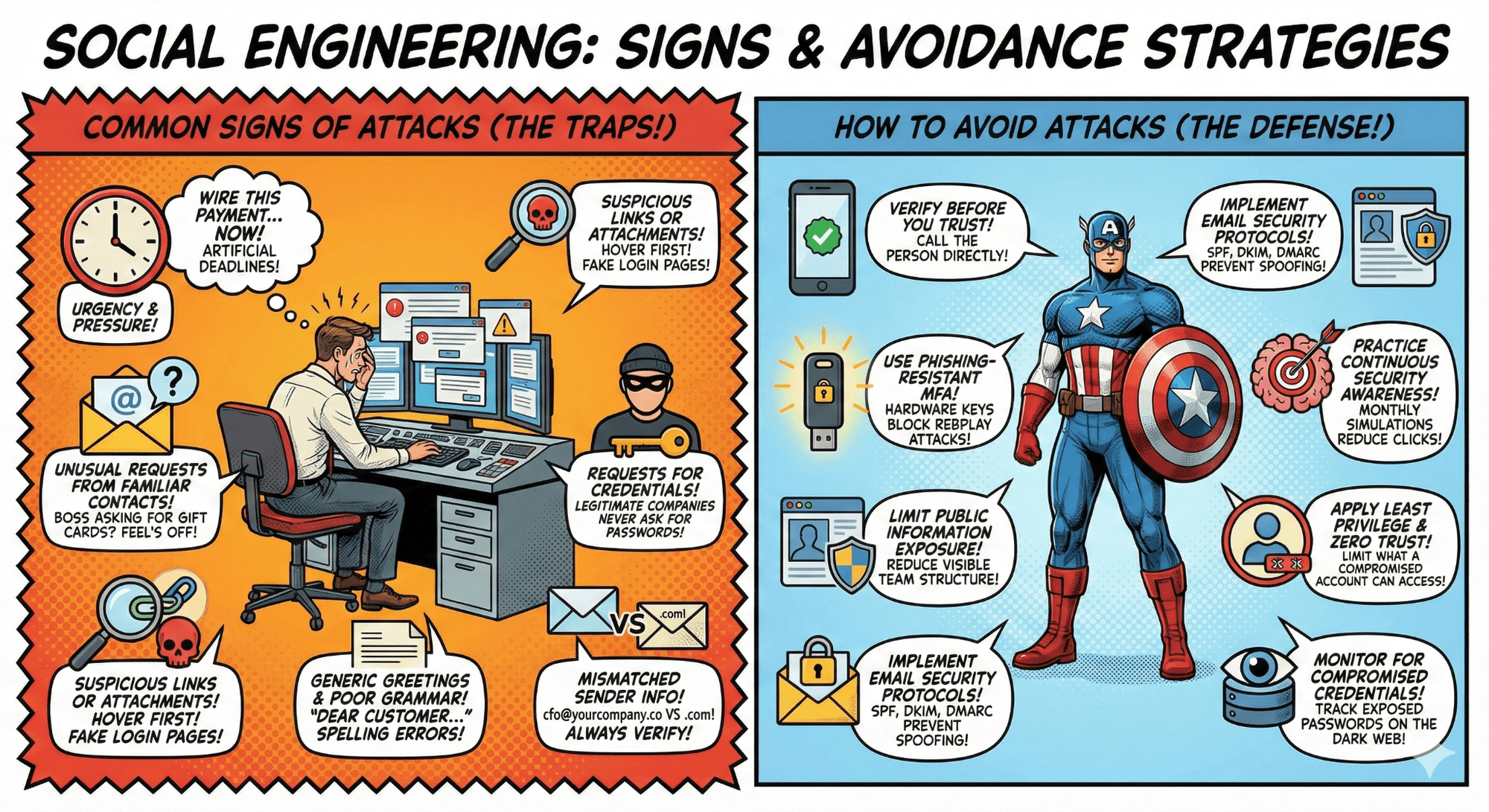
Attackers create artificial deadlines. "Wire this payment in the next hour" or "Your account will be suspended unless you verify now." Real requests rarely demand instant action without proper channels.
Your boss is asking for gift cards over email. A vendor requesting payment to a new bank account via Slack. If the request feels off, it probably is. Verify through a separate communication channel.
Phishing emails often include links to fake login pages or malicious attachments. Hover over links before clicking: does the URL match the sender's domain? Be especially cautious with shortened URLs that hide the destination.
Legitimate companies never ask for passwords, MFA codes, or security questions via email or chat. IT teams don't call asking for your login details. If someone does, it's a red flag.
While sophisticated attacks are well written, many phishing attempts still use "Dear Customer" or contain obvious spelling errors. But don't rely on this alone; AI-powered attacks now produce flawless, personalized messages.
An email from "[email protected]" instead of "[email protected]." Display names that match executives but email addresses that don't. Always verify the actual email address, not just the display name.
When you receive an unexpected request, especially involving money, credentials, or sensitive data, verify through a separate communication channel. Call the person directly using a known number. Don't reply to the suspicious message.
Standard SMS or email-based two-factor authentication can be bypassed through SIM swapping, man-in-the-middle attacks, or social engineering. Use hardware security keys (FIDO2/WebAuthn) or platform biometrics that cryptographically bind authentication to specific domains. This blocks credential phishing and replay attacks even if users are tricked into entering credentials on fake login pages.
Attackers use LinkedIn, GitHub, and public organizational charts to identify targets. Reduce what's publicly visible about your team structure, technology stack, and internal processes. Conduct regular OSINT audits to see what attackers can find.
Configure SPF, DKIM, and DMARC to prevent email spoofing. Use email filtering to sandbox suspicious links and attachments. Monitor for lookalike domains that mimic your company name.
Annual training doesn't work. Run monthly simulated phishing campaigns with immediate feedback. Studies show organizations using regular simulations reduce phishing click rates by up to 76% within months.
Limit what any single compromised account can access. Use conditional access policies that consider device health, location, and behavior. Implement just-in-time access for privileged operations that expire automatically.
Track exposed passwords on the dark web and breach databases. Force password resets when credentials appear in known breaches. Use services like Have I Been Pwned to monitor corporate email addresses, and consider enterprise credential monitoring solutions that provide real-time alerts and automated response workflows.
If your manager asks for something out of the ordinary via email or chat, verify it: Call them. Walk to their desk. Attackers count on people following authority without questioning.
Urgency is a manipulation tactic. Real emergencies still allow time to verify. Take 60 seconds to confirm before acting on time-sensitive requests involving money or access credentials.
Before clicking any link, hover over it to see the actual URL. Does it match the expected domain? Be especially cautious with shortened links that obscure the destination.
Your password, MFA codes, and security answers are never requested by legitimate services via email, chat, or phone. IT teams don't call asking for your login information. If someone does, report it immediately.
When you receive a phishing attempt (even if you didn't fall for it), report it to your security team. One person's near-miss helps protect everyone else. Use your organization's reporting tools or forward suspicious emails to security@yourcompany.
A password manager generates and stores unique passwords for every account. If one service is breached, attackers can't reuse those credentials elsewhere. This blocks credential stuffing attacks.
When a third-party app asks to 'Sign in with Google' or 'Connect to your Microsoft account,' review what permissions it's requesting. Does a simple productivity tool really need access to read all your emails?
Don't use your work email for personal services. Breaches of consumer services shouldn't give attackers a path into your corporate environment.
Stopping every social engineering attack is impossible, but you can limit the damage with layered defenses across technology, people, and visibility.
To reduce risk, security teams can request that all access be documented:
Secure.com's Digital Security Teammates augments your security team by providing:
Secure.com's Digital Security Teammates provide:
A mid-sized financial services company with 2,500 employees experienced a surge in social engineering attacks. With teams spread across AWS, Azure, Google Workspace, Salesforce, and Slack (and a hybrid workforce) they had already lost $890,000 to a single phishing incident.
The root issue wasn’t a lack of tools, but a growing human attack surface. Employees worked from personal devices, shadow IT had introduced 47 unsanctioned SaaS apps, contractors kept access long after projects ended, and third-party vendors connected directly to core systems. Annual security training wasn’t helping—phishing click rates stayed stuck at 23%.
They shifted to a layered, people-aware defense. Phishing-resistant MFA was rolled out across cloud apps. CASB brought visibility into sanctioned and unsanctioned SaaS use. Privileged access moved to just-in-time with automatic expiration. Annual training was replaced with monthly phishing simulations and quick, targeted follow-ups. OAuth permissions were audited automatically, and compromised credentials were monitored in real time.
Within six months, measurable results emerged: phishing click rates dropped from 23% to 4% (an 83% reduction), mean time to detect fell from eight hours to 12 minutes (96% faster), and over-privileged accounts decreased by 67%.
Most importantly, zero successful BEC incidents occurred in the following year, while employee reporting of suspicious activity increased significantly—shifting the security culture from passive to proactive.
Financially, it was an easy decision. The earlier $890,000 loss was nearly twice their annual security budget. Preventing just one more incident paid for the program—while actually reducing day-to-day workload for the security team.
Phishing, where mass emails trick users into clicking malicious links. Spear phishing, a more targeted version tailored to specific individuals. Pretexting, where attackers fabricate scenarios to manipulate victims (like posing as IT support). Baiting, which uses tempting offers such as free USB drives or downloads to deliver malware. Vishing, or voice phishing, where attackers impersonate trusted figures over the phone to extract sensitive data.
Strong basics like phishing-resistant MFA, least-privilege access, and zero-trust policies go a long way. Keeping OAuth permissions and third-party access under control helps. When you pair that with behavior monitoring and automated response, attacks are much easier to catch early.
The attack surface is who and what attackers can target: employees, public profiles, email patterns, and exposed access points. Attack vectors are how they attack: phishing emails, fake login pages, executive impersonation, or fraudulent calls.
One compromised account can grant access across cloud platforms and SaaS tools through persistent OAuth tokens or API keys. Third-party integrations increase the blast radius even further, as a single compromised credential may provide access to multiple connected services.
Technical controls protect infrastructure, while social engineering targets people. In cloud environments where identity is the perimeter, the human element becomes your largest attack surface component.
The organizations succeeding aren't trying to prevent every social engineering attempt. They're limiting what compromised credentials can access through zero trust architecture, continuous monitoring, and attack surface intelligence.
Because when your employees are the perimeter, security becomes everyone's responsibility, not just IT's problem. And in that shared responsibility model, visibility into your human-cloud attack surface makes the difference between containment and catastrophe.
Tracking the right cybersecurity metrics transforms security from "we think we're protected" to "we can prove we're reducing risk."
Discover how Digital Security Teammates automate Tier 1 investigations, cutting response times by 45-55% while keeping humans in control of every decision.
SIEM collects and correlates security data—SOAR automates the response, and together they transform reactive SOCs into proactive defense operations.