TL;DR: Here is the short version of risk vs. threat vs. vulnerability. A vulnerability is a weak spot in your systems, people, or processes. A threat is anyone or anything that could use that weak spot to cause harm. Risk is how likely that harm is and how bad it would be. You can’t control most threats, but you can fix weak spots and limit damage, and that is how risk goes down.
For the first time in the report’s 19 years, Verizon’s 2026 Data Breach Investigations Report found that exploiting a vulnerability was the top way attackers broke in, behind 31% of breaches. Yet many teams still use “risk,” “threat,” and “vulnerability” as if they mean the same thing. That confusion sends time and budget to the wrong fixes.
Risk vs Threat vs Vulnerability at a Glance
| Vulnerability | Threat | Risk | |
|---|---|---|---|
| What it is | A weak spot | Who or what could cause harm | The chance of harm plus how bad it would be |
| Question it answers | Where are we weak? | Who could hurt us? | How worried should we be? |
| Can you control it? | Yes, mostly | Rarely | Yes, by fixing weak spots and limiting damage |
| Example | A VPN that hasn’t been patched | A ransomware gang | Customer data stolen and systems locked for days |
| Who usually owns it | IT and engineering | SOC and threat intel teams | Security leaders and the board |
What Is a Vulnerability?
A vulnerability is a flaw or gap that someone could use to get in or cause damage. It can live in code, a setting, a process, or a person’s habits.
On its own, a vulnerability does nothing. It only becomes a problem when a threat can reach it.
The pile keeps growing every year. A record 48,185 CVEs were published in 2025, and each CVE is a public ID for one known flaw. If you want the details on how those IDs get scored, here’s how CVE and CVSS work together.
Common Types of Vulnerabilities
- Technical: unpatched software, coding bugs, weak encryption
- Configuration: cloud storage open to the public, default passwords, too many admin rights
- Human: staff who click phishing links or reuse passwords
- Process: no patch schedule, no offboarding checklist, backups nobody tests
- Physical: unlocked server rooms, lost laptops
What Is a Threat?
A threat is any person, group, or event that could exploit a vulnerability and cause harm. Hackers, malware, a careless employee, and even a flood all count.
You usually can’t stop a threat from existing. What you can do is make it much harder for that threat to succeed.
The Four Types of Threats
Network security training, including Cisco’s security curriculum, sorts threats into four types:
- Unstructured: amateurs who use downloaded tools against widely known flaws
- Structured: skilled, organized groups with a clear goal, such as hackers backed by a nation-state
- External: anyone outside your company
- Internal: employees, contractors, or partners, acting on purpose or by mistake
These groups overlap. A structured group can also work from the inside, for example through a hired insider.
Threat Actor vs Threat Event
The threat actor is who acts, like a ransomware gang. The threat event is what they do, like encrypting your file servers. Keeping the two apart makes incident reports clearer and easier for leaders to read.
What Is a Risk?
Risk is the chance that a threat will use a vulnerability, combined with how much damage it would cause. NIST frames it around two things: how likely something bad is, and how big the impact would be.
Risk is the part leaders actually decide on, because it ties a technical flaw to money, downtime, and trust. And the money is real: IBM’s 2025 Cost of a Data Breach Report put the global average cost of a breach at $4.44 million, and the US average at a record $10.22 million.
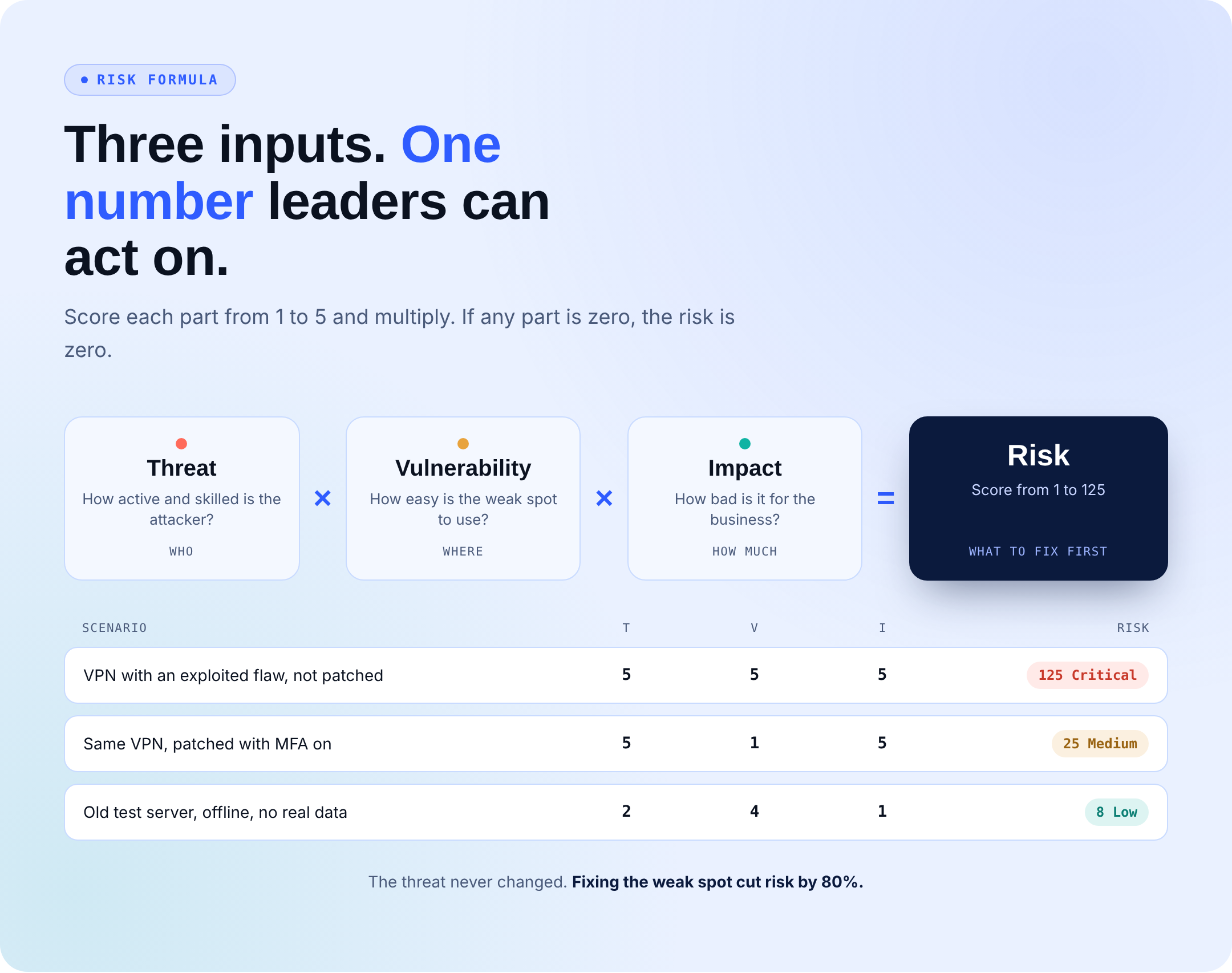
The Risk Formula: Risk = Threat x Vulnerability x Impact
Score each part from 1 to 5, then multiply them.
- Threat: How active and skilled is the attacker?
- Vulnerability: How easy is the weak spot to use?
- Impact: How bad would it be for the business?
| Scenario | Threat | Vulnerability | Impact | Risk score |
|---|---|---|---|---|
| VPN with a known, actively exploited flaw, not patched | 5 | 5 | 5 | 125 (Critical) |
| Same VPN, now patched with MFA turned on | 5 | 1 | 5 | 25 (Medium) |
| Old test server, offline, holds no real data | 2 | 4 | 1 | 8 (Low) |
Score bands: 1 to 24 Low, 25 to 59 Medium, 60 to 99 High, 100 to 125 Critical.
Look at the first two rows. The threat stayed at 5 the whole time, and fixing the weak spot alone cut the score from 125 to 25. That’s why most risk work focuses on vulnerabilities and impact, not on the attackers themselves.
The math also explains a simple rule: if any part is zero, the risk is zero. No threat, no weak spot, or nothing of value means nothing to lose.
How to Read a Risk Matrix
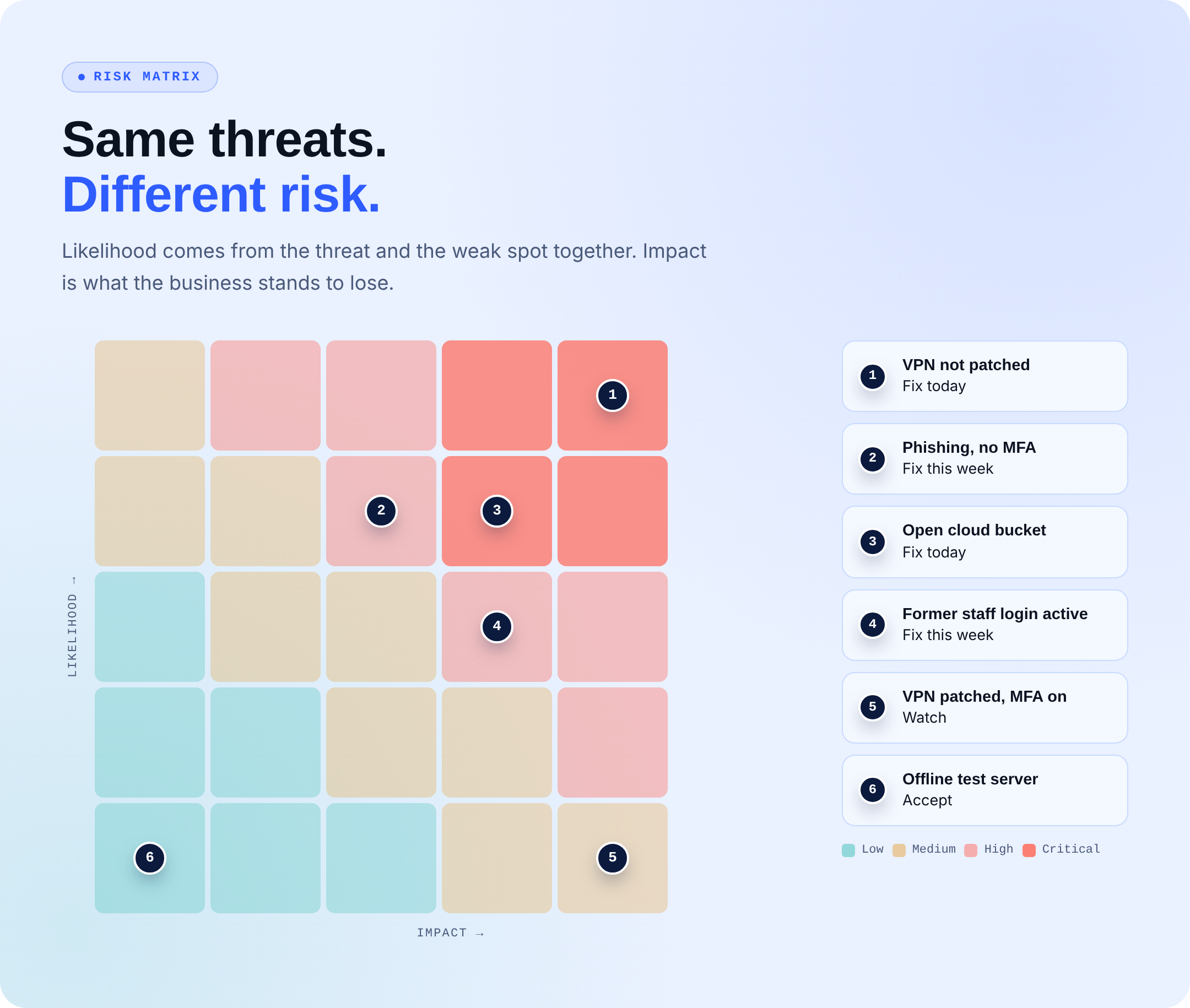
A risk matrix places likelihood (threat and vulnerability together) against impact on a 5 by 5 grid. Anything in the top right corner gets fixed now. Anything in the bottom left gets watched or accepted.
One common mistake is treating a severity score as a risk score. CVSS tells you how bad a flaw is in general, not how bad it is for your business, which is why a CVSS score is not a risk score on its own.
Threat vs Vulnerability vs Risk vs Exploit
An exploit is the tool or method that turns a vulnerability into a working attack. Forrester calls it weaponizing a vulnerability.
Here’s how the four connect: the threat (who) uses an exploit (how) on a vulnerability (where), and the result is risk (what you could lose).
Example: A criminal group (threat) runs a public proof-of-concept script (exploit) against your file transfer server that hasn’t been patched (vulnerability). The risk is stolen customer files, fines, and lost trust.
A public exploit changes everything about likelihood. Only around 5% of published CVEs are ever seen being exploited, according to FIRST’s Exploit Prediction Scoring System. So a flaw attackers are using right now should take priority over a scarier-looking flaw nobody is touching.

Threat vs Risk: The Pair People Mix Up Most
A threat is the “who” or “what.” Risk is the “so what.” NIST’s own glossary team has pointed out that people often use the two words as if they were the same.
Here’s the difference in one sentence. “Ransomware is our biggest risk” names a threat. “There’s a high chance ransomware could lock our billing system for a week and stop us from sending invoices” names a risk and gives the board something to act on.
Risk vs Threat vs Vulnerability Examples in Cybersecurity
| Vulnerability | Threat | Risk | Fix |
|---|---|---|---|
| VPN not patched | Ransomware gang scanning the internet | Network takeover and days of downtime | Patch fast, turn on MFA |
| Staff not trained to spot phishing | Phishing crew | Stolen logins and fake payment requests | Training, MFA, payment callbacks |
| Cloud storage bucket open to the public | Bots that hunt for open buckets | Customer data leak and fines | Lock access, check settings daily |
| Former employee’s account still active | Unhappy former staff member | Data theft or sabotage | Remove access on their last day |
| Flat network with no segments | Malware spreading inside | One infected laptop takes down everything | Split the network, limit admin rights |
How to Manage All Three
Once your team agrees on risk vs. threat vs. vulnerability, managing them follows a simple loop.
- List your assets. You can’t protect systems you don’t know you have.
- Find the weak spots. Scan code, cloud accounts, endpoints, and settings on a set schedule.
- Track active threats. Check which flaws attackers are using right now, for example, with CISA’s Known Exploited Vulnerabilities catalog.
- Score the risk. Use threat x vulnerability x impact, and tie impact to what each asset is worth to the business. This guide on how to decide what to fix first goes deeper on ranking.
- Pick a treatment. You can accept the risk, avoid it, transfer it (cyber insurance is a common way), or mitigate it.
- Prove the fix worked. Rescan and retest. A closed ticket doesn’t always mean a closed risk.
Step 6 is where most programs slip. The 2026 DBIR found that only 26% of critical flaws on CISA’s exploited list were fully fixed in 2025, down from 38% the year before.
Find the Weak Spots Before Someone Else Does
Knowing risk vs. threat vs. vulnerability is the first step. Most teams don’t lack data on threats and vulnerabilities. They lack the hours to sort it, fix what matters, and explain the risk to leadership, and that’s the work Secure.com takes off your plate as one managed service.
- Managed Exposure Management finds weak spots across your cloud and systems, ranks the ones attackers can actually reach, and checks that each fix holds.
- Managed SecOps watches for threats around the clock, filters out the noise, and brings in security experts fast when something real shows up.
- A vCISO turns your risk picture into a plan, keeps compliance on track, and handles board reporting without the cost of a full-time hire.
- One service and one bill, so you aren’t juggling separate tools, vendors, or teams.
- Reports that tie every fix to the risk it lowered, so leaders see progress in plain numbers.