
Dateline: May 21, 2026
TeamPCP Hits GitHub Through a Single VS Code Extension
One employee. One extension. About 3,800 stolen repositories.
That’s the math behind the GitHub VS Code extension breach disclosed this week, and it’s the kind of math that should make every security leader pause.
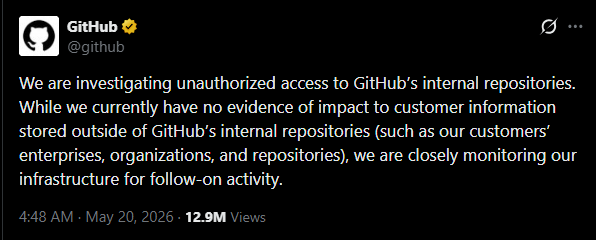
GitHub confirmed on Tuesday that a threat actor exfiltrated approximately 3,800 internal repositories after compromising an employee’s device through a poisoned Visual Studio Code extension, marking one of the most significant breaches the Microsoft-owned company has ever disclosed.
The platform serves more than 180 million developers across over 4 million organizations, including 90% of the Fortune 100. If GitHub can get hit through a plugin, so can anyone.
What Happened?
The breach was detected on May 19 and likely came from a “poisoned” Visual Studio Code extension found by the GitHub security team on an employee device. The compromised plugin was pulled from the official VS Code Marketplace, where it had been quietly siphoning data in the background.
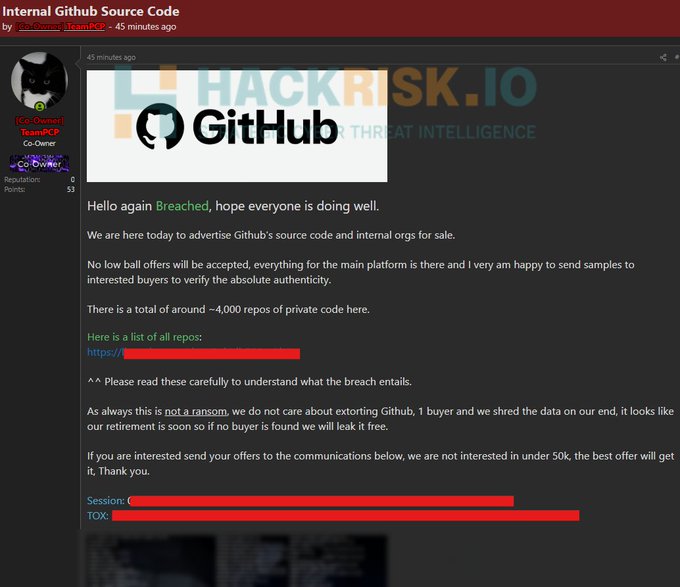
The breach was claimed by the TeamPCP hacking group on the Breached cybercrime forum, where they alleged access to GitHub source code and “4000 repos of private code.” TeamPCP is demanding at least $50,000 for the stolen data, with a threat to leak it for free if no buyer steps forward. Google Threat Intelligence Group tracks the same actor as UNC6780.
GitHub moved fast. “We removed the malicious extension version, isolated the endpoint and began incident response immediately. Critical secrets were rotated yesterday and overnight with the highest-impact credentials prioritized first,” GitHub said. The company says no customer data outside its internal repositories was touched.
The Impact
A few things make this breach sting more than most.
First, the entry point was a marketplace most developers trust by default. Unlike traditional package registries such as npm or PyPI, browser and editor extensions often receive broad system permissions by default, making them particularly attractive to attackers seeking lateral access.
Second, the timing. This wasn’t a one-off. On May 18, attackers published a compromised version of the Nx Console VS Code extension, installed more than 2.2 million times. The malicious version harvested tokens from GitHub, npm, AWS, HashiCorp Vault, Kubernetes, and 1Password. Supply chain attacks against developer tooling are not slowing down.
Third, the credentials. Private repos are full of secrets developers think nobody will ever see: API keys, tokens, service credentials. Every leaked secret is a head start for the next attacker.
How to Avoid This
Build Defense Around the Developer, Not Just the Network
Endpoint compromise through trusted tooling is the new normal. A few practical moves:
- Vet every extension. Allowlist plugins. Check publisher reputation, install counts that look suddenly inflated, and recent ownership changes.
- Rotate secrets on a schedule, not after a breach. API keys and tokens sitting in private repos are still credentials. Treat them that way.
- Apply least privilege to developer endpoints. A junior engineer’s laptop should not hold the keys to production.
- Monitor for unusual data egress. A code editor that suddenly starts talking to unfamiliar domains is a red flag.
- Pre-stage your incident response. GitHub contained this in under a day because they knew exactly which credentials mattered most. Most teams don’t.
When One Endpoint Can Cost You 3,800 Repos, Visibility Is the Whole Game
A poisoned extension only becomes a disaster when nobody sees the blast radius until it’s too late. Secure.com closes that gap.
- Real-time asset and endpoint visibility across cloud, SaaS, and developer environments, so a rogue extension on one device doesn’t go unnoticed for days.
- Attack path analysis maps how a single compromised endpoint could chain into source code, secrets, and production access.
- Identity and access context surfaces over-permissioned developer accounts before attackers find them.
- Digital Security Teammates triage suspicious activity around the clock and escalate only what humans actually need to decide.
- Automated workflows rotate credentials, isolate endpoints, and trigger response playbooks the moment a compromise is detected.