TL;DR
Attackers now get in through unpatched bugs more than any other way. Good patch management comes down to a few habits: know every asset, fix exploited bugs first, roll patches out in small rings, and rescan to prove each fix worked. Put your deadlines in a written policy so emergency patches move in days and everything else follows a steady monthly rhythm.
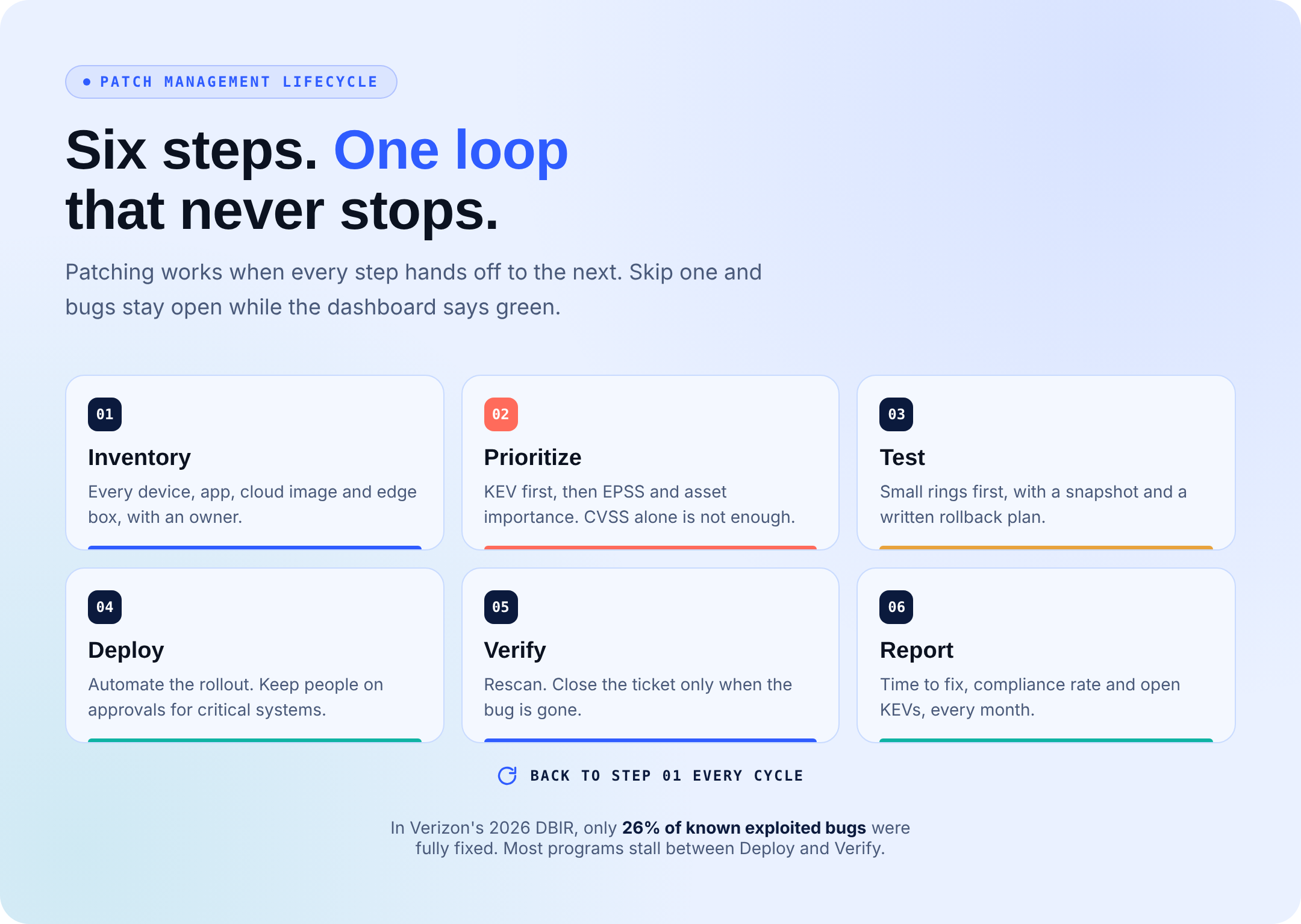
For the first time in the report’s 19 year history, Verizon’s 2026 DBIR names exploited vulnerabilities as the top way attackers break in, accounting for 31% of attacks, up from 20%. In the same report, only 26% of CISA’s Known Exploited Vulnerabilities (KEVs) were fully remediated in 2025, down from 38% the previous year, and the median fix took 43 days. That gap is where breaches happen, so here’s how to close it.
What Is Patch Management and Why Does It Fall Behind?
Patch management is the process of finding, testing, installing, and checking the software updates that fix bugs. It covers operating systems, apps, firmware, cloud images, and the network devices that sit at the edge of your environment.
Most teams fall behind for the same handful of reasons:
- Too many bugs: published CVEs reached 48,244 (up 20% year over year).
- Attackers move first: Mandiant’s M-Trends 2026 report puts estimated mean time to exploit at negative seven days. That means many attacks start before a patch even exists.
- Too much manual work: in a 2025 Mondoo survey, 62% of security teams still used manual methods for remediation, while only 2% used fully automated methods.
- Fear of breaking things: a bad patch can take down a business app, so teams wait, and the window stays open.
Patch Management vs Vulnerability Management
People mix these up all the time. Vulnerability management finds and ranks your risk. Patch management delivers one kind of fix for it.
| Area | Patch management | Vulnerability management |
|---|---|---|
| Main job | Install vendor updates | Find, rank, and reduce risk |
| Scope | Software and firmware that has a fix | Bugs, weak settings, exposed services, and missing patches |
| Trigger | A vendor release or a set schedule | Scans, threat intel, and attack paths |
| Usual owner | IT operations | Security team |
| Done when | The update is installed | The risk is gone or formally accepted |
The best vulnerability management programs feed patch teams a short, ranked list instead of a 10,000 row spreadsheet. If your problem is bigger than missing updates, our guide on vulnerability remediation best practices covers fixes that go beyond patching.
10 Patch Management Best Practices
1. Keep a Complete Asset Inventory
You can’t patch a server nobody knows about. List every laptop, server, cloud workload, container image, network device, and app, along with its owner and how important it is to the business.
Put edge devices like VPNs and firewalls at the top of that list. In Verizon’s 2025 data, the median time from disclosure to mass exploitation for edge KEVs is zero days.
Connect your inventory to your scanner so new assets show up on their own instead of waiting for someone to add them.
2. Write a Patch Policy With Clear Deadlines
A patch policy answers three questions: who patches what, how fast, and who signs off. Without written deadlines, “soon” quietly turns into “next quarter.”
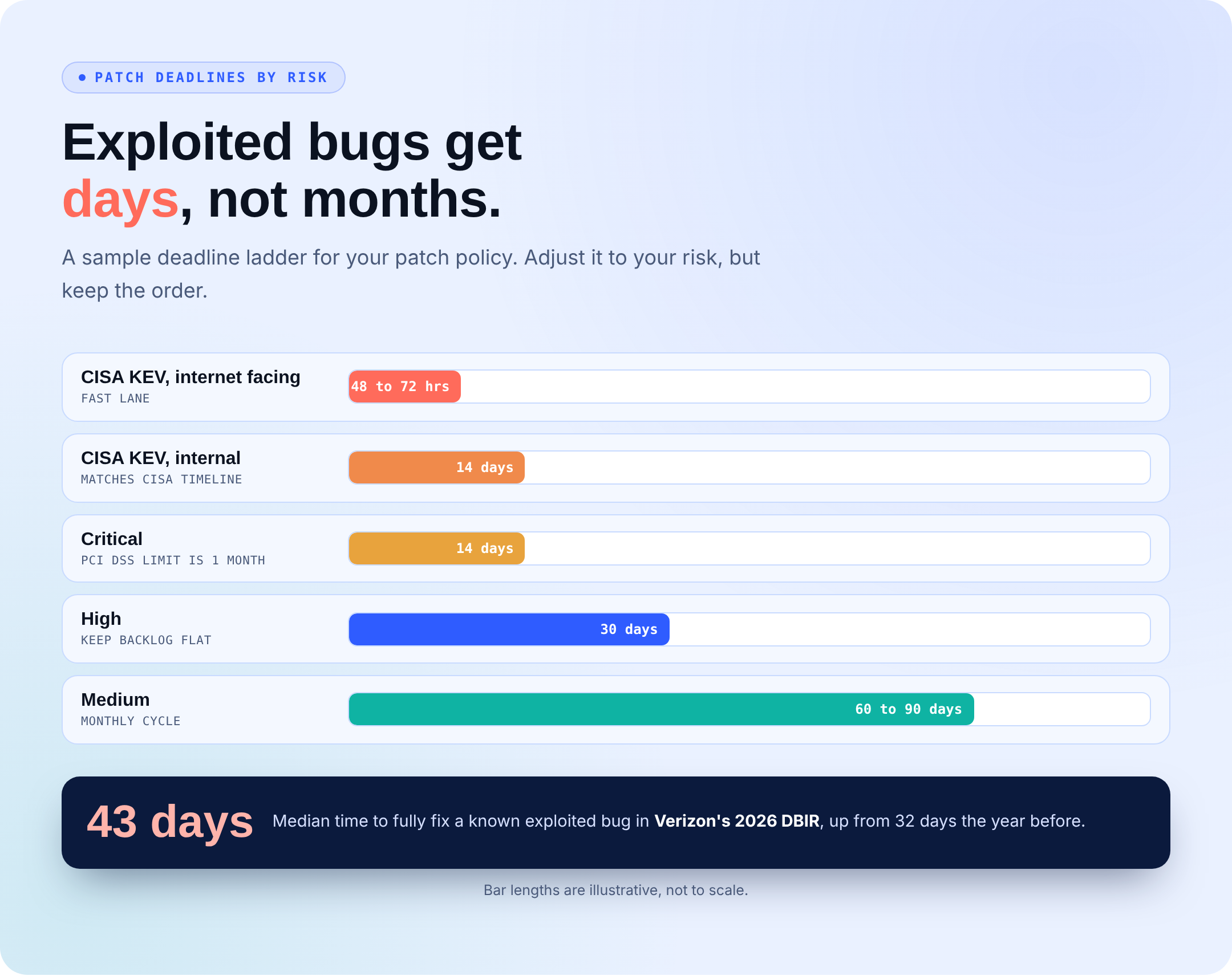
Use real rules as your floor. CISA’s directive gives federal agencies six months for CVEs assigned prior to 2021, and within two weeks for all others on its Known Exploited Vulnerabilities (KEV) list. Under PCI DSS 4.0.1, patches for critical vulnerabilities must be installed within one month of release, and other applicable security patches need risk appropriate timeframes.
| Patch type | Suggested deadline | Why |
|---|---|---|
| On CISA KEV and internet facing | 48 to 72 hours | Attackers are already using it |
| On CISA KEV, internal | Within 14 days | Matches the CISA timeline for federal agencies |
| Critical | Within 14 days | Stays well inside the PCI DSS one month limit |
| High | Within 30 days | Keeps your backlog from growing |
| Medium | Within 60 to 90 days | Fits your normal monthly cycle |
| Low | Next regular cycle | Bundle with routine updates |
| Suggested patch deadlines (adjust to your risk) | ||
3. Rank Patches by Real Exploit Risk
A CVSS score tells you how bad a bug could be. It doesn’t tell you whether anyone is actually using it. Check these signals before you decide what goes first:
- Is the bug on the CISA KEV list?
- What is its EPSS score? EPSS estimates the chance a bug gets exploited in the next 30 days.
- How important is the asset, and can someone reach it from the internet?
A medium CVSS bug on a public VPN that’s already on the KEV list should beat a critical CVSS bug on an isolated test box every time. This is the core idea behind exposure management: rank bugs by what attackers can actually reach.
4. Don’t Skip Third-Party and Open Source Software
Windows updates get all the attention. Browsers, PDF readers, archive tools, Java, meeting apps, and open source libraries often get skipped, and attackers know it. Operating system patching alone leaves a large share of real exposure untouched.
Here’s a real example. Threat actors, including state-sponsored groups, are actively exploiting a WinRAR bug despite a patch released in July 2025.
For open source, use a software composition analysis (SCA) tool to spot weak libraries in your code. For containers, patch the base image and redeploy instead of patching containers while they run.
5. Test in Rings Before a Full Rollout
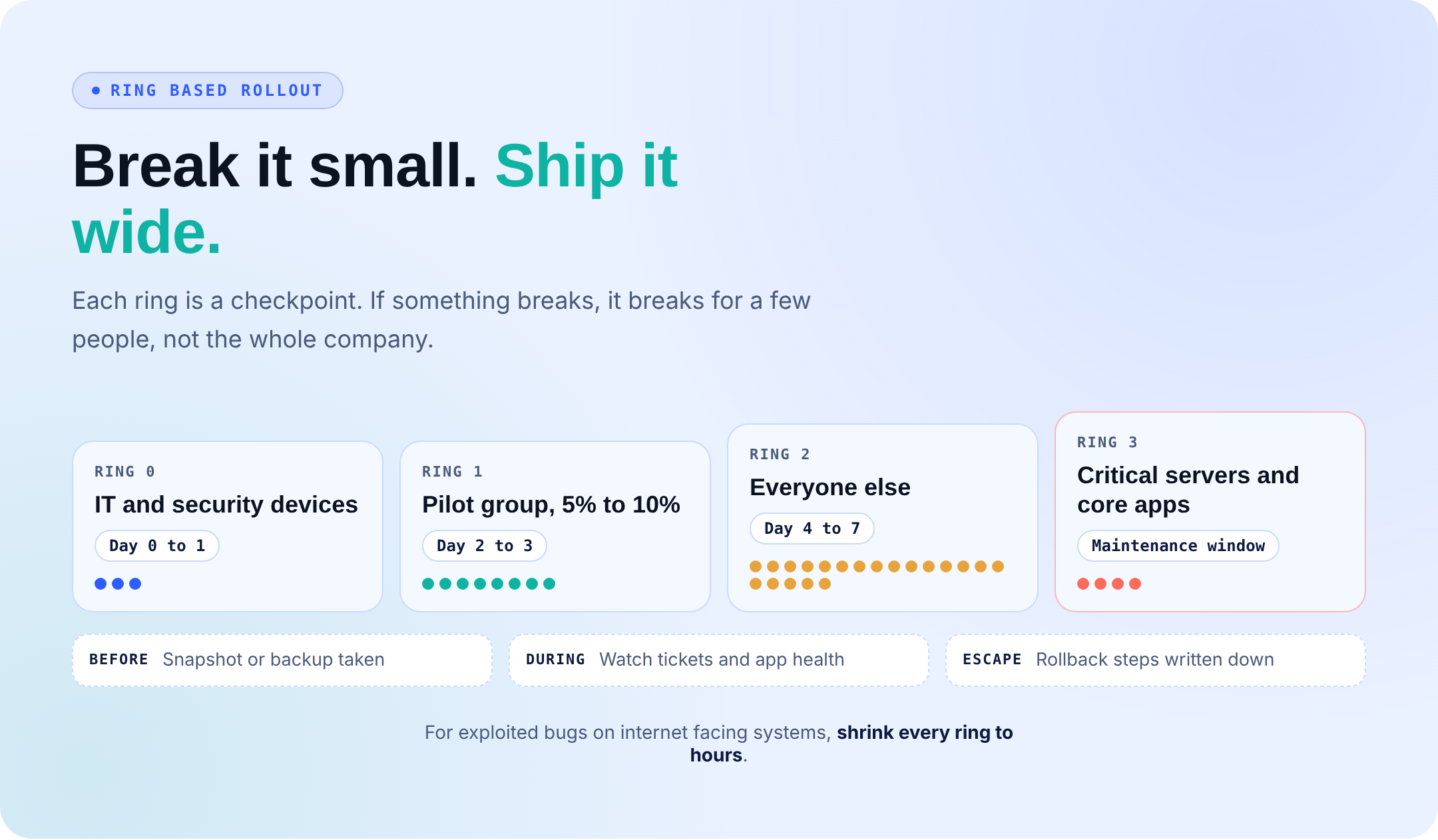
This is how you patch without breaking production. Send each patch to a small group first, watch for problems, then widen the circle.
| Ring | Who gets it | When | What to watch |
|---|---|---|---|
| Ring 0 | IT and security team devices | Day 0 to 1 | Install errors, crashes |
| Ring 1 | Pilot group of 5% to 10% of users across departments | Day 2 to 3 | Help desk tickets, app issues |
| Ring 2 | Everyone else | Day 4 to 7 | Install success rate |
| Ring 3 | Critical servers and core business apps | Next maintenance window | Service health, rollback readiness |
Take a snapshot or backup before each ring, and write down the rollback steps before you start. For exploited bugs on internet facing systems, shrink the rings to hours instead of days.
6. Automate Deployment, Keep People on Approvals
Let tools handle downloads, scheduling, reboots, and reports. A person should still approve changes to high-impact systems like domain controllers, payment systems, and production databases.
A simple split works well. Auto-approve low-risk app updates like browsers, and send anything that touches revenue or identity through a quick human review.
7. Set Up an Emergency Patch Path
Decide who approves emergency patches before you need them. A common setup: the security lead declares the emergency, the system owner approves the change, and the change board reviews it afterward.
Write down what triggers the fast lane. Good triggers include a KEV listing, a vendor warning about active attacks, or public exploit code for an internet-facing system.
Speed matters here. In June 2026, CISA gave federal agencies only three days to patch a Splunk Enterprise bug that was exploited in attacks days after disclosure.
8. Check That the Fix Actually Worked
An “installed” status in your patch tool is not proof. Some patches need a reboot, some need a settings change, and some fail without telling anyone.
Rescan after you patch, and close the ticket only when the scanner shows the bug is gone. That rescan is the continuous monitoring step that keeps the vulnerability management lifecycle honest.
For bugs that were already exploited, patching may not be enough. In 2026, hackers were actively exploiting a SharePoint flaw to steal machine keys and maintain access even after affected servers are patched. After an emergency patch, rotate secrets and look for signs someone already got in.
9. Use Compensating Controls When You Can’t Patch Yet
Sometimes there is no patch, or the patch breaks an app the business can’t live without. Buy time with controls like these:
- Take the system off the internet or block the exposed port
- Turn off the vulnerable feature
- Add a WAF or IPS rule for the known attack
- Lock down access with MFA and network segmentation
- Watch the system closely for signs of attack
Log every exception with an owner and an end date so “temporary” doesn’t become permanent.
10. Track the Metrics That Matter
What you measure is what gets fixed. Report these to leadership every month.
| Metric | What it tells you | Good target |
|---|---|---|
| Mean time to remediate (by severity) | How fast you close bugs | Inside your policy deadlines |
| Patch compliance rate | Share of assets fully patched | 95% or higher for critical patches |
| Open KEV count | Exploited bugs still open | Zero past deadline |
| Asset coverage | Share of assets your tools can see | As close to 100% as possible |
| Failed patch rate | Patches that had to be rolled back | Going down over time |
To cut the manual work behind these numbers, see how teams automate vulnerability management with routing and SLA tracking.
Windows Patch Management Best Practices
Windows is where most companies start, and the volume keeps climbing. In April 2026, Microsoft released updates to address a record 169 security flaws across its product portfolio.
- Plan around Patch Tuesday. Microsoft releases updates on the second Tuesday of every month, so book your Ring 0 testing for the next morning.
- Watch for out-of-band updates. Microsoft sometimes ships urgent fixes outside the monthly cycle, and those belong in your emergency path.
- Use deployment rings in Windows Update for Business or Windows Autopatch instead of pushing to every device at once.
- Plan your WSUS exit. Microsoft officially deprecated WSUS on September 20, 2024, and urges organizations to migrate to cloud-based alternatives, including Microsoft Intune, with Windows Autopatch for PCs and Azure Update Manager for servers.
- Don’t forget Microsoft 365 Apps, Edge, and drivers. They ship fixes too.
- Set reboot deadlines so devices don’t sit in “pending restart” for weeks.
Is SCCM Still Used for Patch Management?
Yes. SCCM is now called Microsoft Configuration Manager, and many companies still use it to patch on-premises Windows fleets. Microsoft says WSUS deprecation does not impact existing capabilities or support for Microsoft Configuration Manager. Configuration Manager still requires WSUS as its software update point, so many teams now pair it with Intune as they move more devices to the cloud.
What Should Patch Management Software Do Beyond Deploying Patches?
Pushing updates is the easy part. A good tool covers the whole loop.
| Capability | Why it matters |
|---|---|
| Asset discovery | Finds devices nobody registered |
| Third party app catalog | Covers apps beyond the operating system |
| Risk based ranking | Uses KEV, EPSS, and asset importance |
| Ring and test workflows | Catches bad patches early |
| Rollback | Undoes a broken update fast |
| Fix verification | Confirms the bug is gone with a rescan |
| Reports and audit trail | Proves compliance to auditors |
| Integrations | Connects to your scanner, ticketing, and SIEM |
Common options by type:
- Microsoft native: Intune, Windows Autopatch, Configuration Manager, and Azure Update Manager
- Cross-platform patch tools: ManageEngine Patch Manager Plus, NinjaOne, Automox, and Action1
- Vulnerability platforms with patching built in or connected: for example, Rapid7 offers Active Patching powered by Automox, which lets teams automatically remediate vulnerabilities or apply compensating controls in real time, even when a patch doesn’t exist
Managed Patch Management: When Does It Make Sense?
Managed patch management means an outside team runs the process for you, from ranking bugs to proving they’re fixed.
| Factor | In house | Managed |
|---|---|---|
| Best for | Large IT teams with a mature process | Lean teams, many sites, heavy audit pressure |
| Cost | Salaries plus tool licenses | One service fee |
| Emergency speed | Depends on who’s on shift | 24/7 coverage |
| Control | Full | Shared, set by contract |
You probably need help if deadlines slip every month, nobody owns third-party apps, or every audit turns up the same patch gaps.
Shrink the Gap Between Patch Day and Exploit Day
Patching breaks down when nobody owns the full loop, from spotting the bug to proving it’s gone. Secure.com runs that loop for you as a service, with expert analysts making the calls and everything on one bill.
- Managed Exposure Management finds weak spots across your cloud and systems, ranks the ones attackers can actually reach, fixes them, and verifies each fix worked.
- A vCISO gives you a part-time senior security leader who sets patch deadlines, owns emergency approvals, and handles compliance and board reporting without a full-time hire.
- Managed SecOps watches your environment 24/7, so if a bug gets exploited before you patch, experts step in and stop it.
- You get security outcomes instead of another pile of tools to run, with one service and one bill.