
Quick Verdict
- Red teams beat tools by chaining low-severity events your stack treats as normal. The kill chain is built from noise.
- The most common blind spots are identity abuse, living-off-the-land techniques, and slow-burn persistence, not novel exploits.
- Detection gaps are usually configuration problems, not product problems. Tuning and use-case design beats new tooling almost every time.
- The post-exercise report is the most valuable document your security program will read all year. Treat it that way.
What Your EDR, SIEM, and WAF Quietly Miss in Every Red Team Test
Most red team reports end with the same uncomfortable line. The red team got in, moved laterally, reached the crown jewel, and stayed undetected for days. The EDR didn’t fire. The SIEM didn’t correlate. The WAF logged the request and called it normal traffic. Six tools running, two people watching, one attacker who walked out with everything.
That detection gap between what tools catch and what attackers actually do is where every red team exercise lives. Closing it is harder than buying another product.
Why Tools Miss What Red Teams Find
Security tools work on signals. Red teams work on context.
An EDR sees a PowerShell command. It checks the command against known-bad patterns and lets it through. The SIEM sees a successful login from a new IP. The geo-block isn’t configured for that subnet, so the event goes to the index without an alert. The WAF sees a POST request with parameters that look fine in isolation. Each tool makes a defensible call. The red team is counting on it.
Real attackers, and good red teams, don’t trip any single rule loud enough to wake anyone. They chain ten quiet events into one loud outcome.
The Four Patterns That Keep Showing Up
The four patterns that keep showing up in red team reports.
After enough red team reports, the same gaps appear. They are not novel. They are operational debt — the kind that accumulates quietly between tools, teams, and tickets nobody owns.
Identity abuse over exploitation.
Most red teams now skip exploitation entirely. They phish a help desk agent, get a session token, ride a legitimate identity, and never touch a CVE.
Your EDR sees a valid user doing valid things. Your IAM logs show the same. The tools work as designed. The attacker still wins.
Tighter least-privilege policies. Step-up auth on sensitive actions. Behavioral baselines that flag “valid user, weird behavior” patterns.
Why teams miss it — the fix is rarely a new tool, so there is no procurement cycle to force the conversation.
Living-off-the-land techniques.
powershellcertutilmshtawmischtasks — built-in Windows binaries that admins use every day. Red teams use the same ones for execution, persistence, and lateral movement.
The default EDR config flags malicious-looking PowerShell. It does not flag the legitimate-looking PowerShell that does the same thing.
Why teams skip the fix — tightening the rules takes work most teams skip because the false-positive rate spikes for two weeks before it settles.
Slow-burn persistence.
A red team plants a foothold and waits. Three days later, they come back. The login fires no alert because the device, network, and account are all known. The persistence mechanism — a scheduled task or a registry key — was written in week one and is now part of the baseline.
Detection rules tuned to “new” miss persistence that ages into “old.”
Periodic baseline reviews catch this. Most teams don’t run them.
Cross-tool blind spots.
The cloud team’s IAM logs say one thing. The endpoint team’s EDR logs say another. The SIEM ingests both — but the correlation rule was never written because nobody owned the cross-domain use case.
The red team pivots through that exact seam.
None of these patterns require a zero-day. They require an org chart with a seam in it, a default config nobody revisited, or a detection rule tuned for last quarter’s threat model.
Which is to say: they require Tuesday.
Why Red Team Findings Rarely Improve Detections
Most red team findings die in a ticketing system. The report lists what was exploited, someone patches the misconfiguration, and the ticket closes. What almost never happens is the harder step: turning that finding into a SIEM rule that would catch the same technique next time. A closed ticket fixes one instance of a problem. A written detection fixes the pattern.
This is also why blue teams distrust red team findings in the first place. A report that says “we got domain admin via Kerberoasting” reads like a verdict, not evidence. Without raw logs, timestamps, and a query the SOC can actually run against their own SIEM rules, blue teams have no way to confirm what happened, let alone build detection coverage for it. So the finding gets filed as a one-off instead of engineered into the stack.
The other reason findings don’t stick is control drift — the slow gap that opens between what a control was configured to catch and what it actually catches today. Even when a detection gap does get closed after an exercise, nobody revisits it a quarter later. The rule quietly stops matching as the environment changes, and the same red team findings resurface in the next assessment, undetected all over again.
The fix isn’t a better report template. It’s purple teaming — red and blue working the kill chain together in real time, so the detection gets written while the attack path is still fresh in everyone’s head, instead of handed off cold.
What to Do With the Red Team Report
Most red team reports get read once and shelved. That’s the real loss, more than the missed alerts. Here’s how to actually use it.
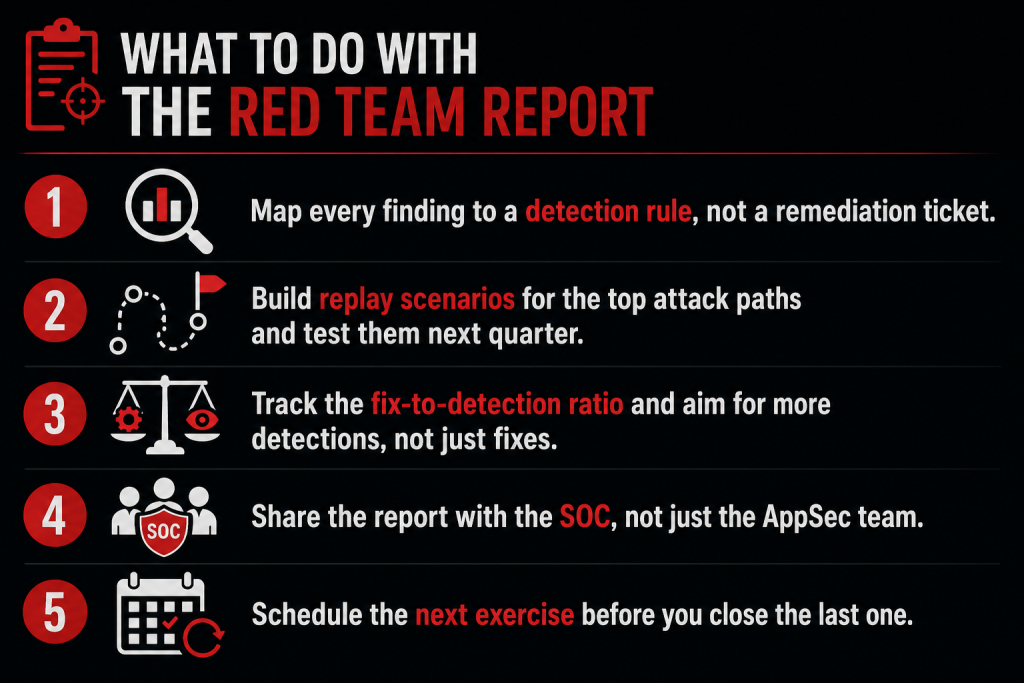
- Map every finding to a detection rule, not a remediation ticket. If the red team got domain admin via Kerberoasting, the question isn’t only “how do we fix the SPN configuration.” It’s also “why didn’t our SIEM see the TGS request pattern.”
- Build replay scenarios. Take the three highest-impact paths the red team walked. Replay them in a controlled test next quarter. If your tools still miss, the gap is structural, not incidental.
- Run findings through purple teaming, not a one-way report. Have red and blue walk the kill chain together so SIEM rules get written while the context is still fresh, instead of losing it to a PDF.
- Track the fix-to-detection ratio. For every misconfiguration the red team exploited, count how many new detection rules you wrote. If the ratio is 10:0, you’re patching symptoms.
- Share the report with the SOC, not just the AppSec team. The people watching alerts at 2am need to know what they should have seen.
- Schedule the next exercise before you close the last one. Annual red teams catch annual problems. The teams that test quarterly find issues while they’re still cheap to fix.
Where Secure.com Fits In
Secure.com turns red team findings into detection content your stack can actually use, instead of leaving them in a PDF nobody opens twice.
- Map every red team finding to a specific SIEM rule, or flag the detection coverage gap if one doesn’t exist yet.
- Auto-generate replay scenarios so you can test whether the fix actually closed the path
- Surface cross-tool blind spots where IAM, EDR, and SIEM data don’t talk to each other
- Track which detection rules fired during the last exercise and which stayed silent
- Hand the SOC and AppSec teams the same view so remediation does not stop at “ticket closed”
- Detection coverage rarely improves after a red team exercise unless findings get purple-teamed into SIEM rules — otherwise control drift quietly reopens the same gap next quarter.