
TL;DR
Attackers don’t break into your repository. They poison something your pipeline already trusts, and your own automation does the rest.
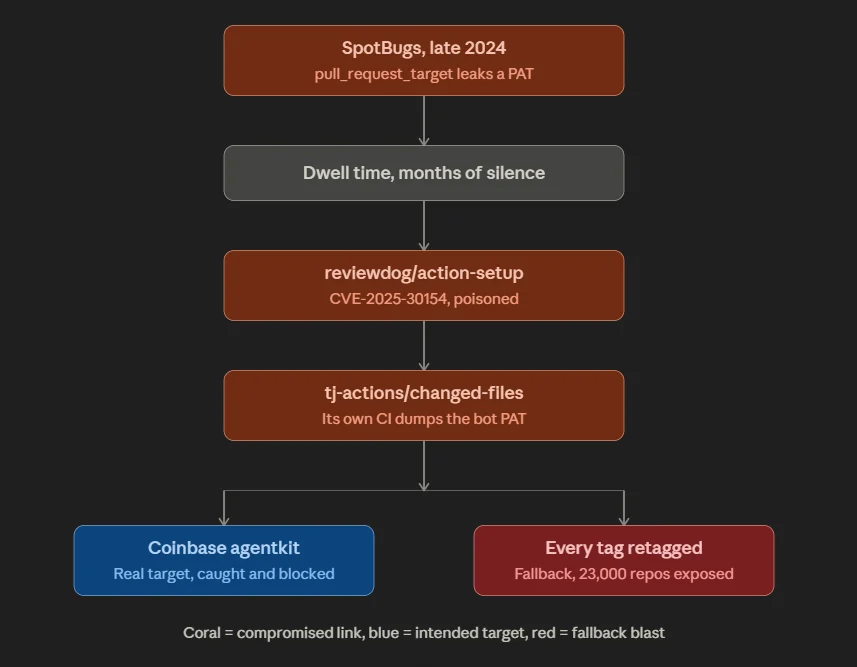
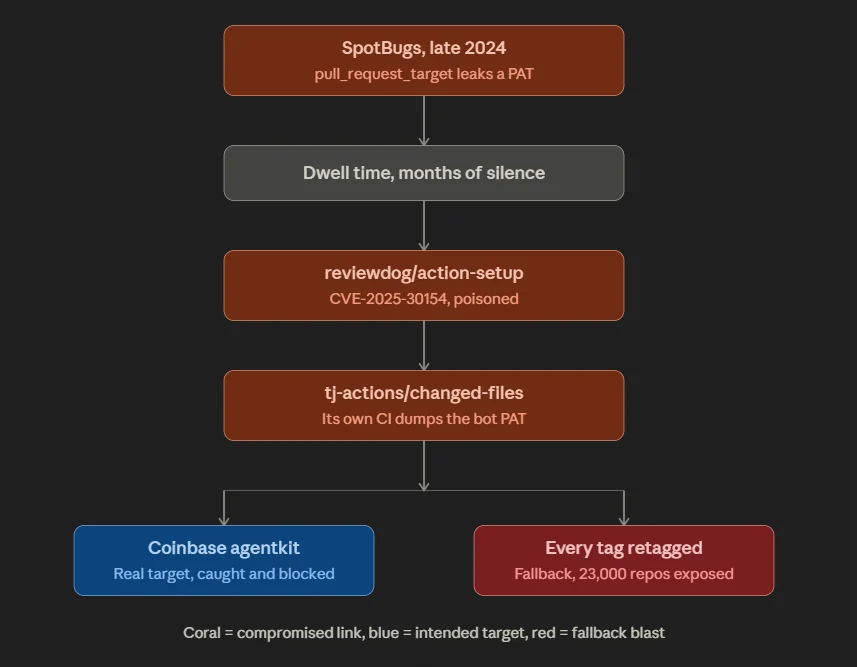
In March 2025, a token stolen from an unrelated Java project walked hop by hop into tj-actions/changed-files — a GitHub Action referenced by roughly 23,000 repositories. The attacker retagged every version to a malicious commit that dumped each build runner’s memory straight into the workflow log.
Three things the coverage mostly got wrong:
- The mass compromise was the fallback, not the plan. The real target was Coinbase. When that failed, the attacker went loud.
- 23,000 repositories were exposed. Far fewer were actually compromised. The gap between those two numbers is entirely a function of how fast you can answer “which of my repos ran this, and what secrets were in scope?”
- Software composition analysis would not have caught it. There was no CVE to match. It was trusted code that turned malicious.
The controls that work: pin to commit SHAs, delete long-lived cloud keys in favour of OIDC, default your workflow tokens to read-only, and watch what your runners talk to.
Introduction
On 14 March 2025, a GitHub Action used by more than 23,000 repositories started printing secrets into public build logs. The action was tj-actions/changed-files. One poisoned commit, retagged across every version, turned thousands of trusted pipelines into a credential dispenser.
Sixteen months later, the specific incident is closed. The pattern is not. Nx, Shai-Hulud, and the npm worms that followed all ran the same play. So this is less a post-mortem than a field guide: how these attacks actually start, how they spread, what you can grep for, and what you can change this week.
What is a GitHub Supply Chain Attack?
A supply chain attack targets the tools you depend on rather than the systems you own. On GitHub that usually means a shared Action or a third-party package.
GitHub Actions is the automation layer that builds, tests, and deploys your code. It runs with your secrets in memory (cloud keys, registry tokens, signing keys). Teams reuse shared Actions to avoid rewriting the same forty lines of YAML, and that reuse is the entire attack surface. Poison one popular Action and every pipeline that references it executes your code, with your victims’ credentials sitting in the same process space.
You are not being asked to trust a library. You are being asked to trust an arbitrary program with root on your build machine and your production keys in RAM.
How the Attack Starts
Act I — The first crack
It started nowhere near GitHub Actions.
In late 2024, a maintainer of SpotBugs, an open-source Java static analysis tool, stored a personal access token as a secret in a CI workflow. That workflow used the pull_request_target trigger.
This is the detail that matters, so here it is plainly:
pull_request_target runs a workflow in the context of the base repository (with full access to its secrets) while it can be induced to check out and execute code from an untrusted pull request.
An attacker opened a malicious pull request from a throwaway account. The workflow ran, with the maintainer’s token in scope, and executed the attacker’s code. The token walked out of the door.
Then nothing happened. For months.
That dwell time (a stolen credential sitting quietly from late 2024 until the payload fired in March 2025) is not incidental. It is what a patient supply chain operation looks like.
Act II — The lateral walk, and the insight everyone missed
Per Palo Alto Networks Unit 42, the attacker used that first token to work sideways: from SpotBugs to a second maintainer account, from there into the reviewdog organisation, and finally into tj-actions.
Every hop used a leaked or stolen token. No exploits. No zero-days. Just borrowed trust.
But look closely at the last hop, because it is the whole lesson:
tj-actions‘ own CI pipeline consumed reviewdog/action-setup. When reviewdog/action-setup was poisoned (CVE-2025-30154), the tj-actions bot’s personal access token was dumped by its own build.
The maintainers of a widely used Action were compromised through their supply chain, and that gave the attacker the keys to poison yours.
The CI/CD pipeline of your dependency is itself a supply chain. You are not one link from an attacker. You are three or four, and you cannot see any of them.
Act III — The real target
Here is where the popular retelling goes wrong.
The 23,000-repository blast was not the objective. Unit 42’s reconstruction shows the attacker’s actual target was Coinbase’s agentkit, an open-source project. On 14 March 2025 the payload executed in Coinbase’s CI and returned a token with write access to the repository.
Coinbase caught it and shut the door.
And then (objective failed, access burning, detection imminent) the attacker retagged tj-actions/changed-files and sprayed the payload at everyone who used it.
That reframes everything:
- The mass event was noise generated by a failing operation, not a masterstroke.
- The payload was deliberately loud precisely because the quiet path had closed.
- If you were hit, you were most likely collateral damage in someone else’s failed heist.
It is also the reason the “full breach” in the headline is real. It just happened to a company that wasn’t you.
Act IV — What actually ran on your runner
The malicious commit — 0e58ed8671d6b60d0890c21b07f8835ace038e67 — was pushed with a spoofed author identity: renovate[bot].
Sit with that. The bot most teams rely on to keep their dependency pins fresh is the identity the attacker wore to poison the dependency.
Every version tag on tj-actions/changed-files — v1 through v45 and beyond — was moved to point at that commit. If your workflow said @v35, @v44, @v45, it didn’t matter. They all resolved to the same poison.
What the commit did:
- Executed a base64-encoded shell command.
- Which curled a publicly available memory-dump script from a GitHub gist. The attacker didn’t even write their own tooling — they reused a security researcher’s published script.
- Which read /proc/<Runner.Worker PID>/mem, regex-scanned it for credentials, and printed them into the workflow log — double-base64-encoded, which is obfuscation in the same sense that a paper bag is a safe.
Two consequences almost nobody spells out:
It never exfiltrated anything. There was no attacker command-and-control, no beacon, no outbound data channel. The secrets were simply published into your own build log and left there for the attacker to come and read.
That is why public repositories were catastrophic and private ones were merely bad. Wiz’s analysis found the leaked material in public logs included live AWS access keys, GitHub tokens, npm tokens, and private keys. In private repos the same memory dump happened — the log just wasn’t world-readable.
The detection signal was egress, not content. StepSecurity’s Harden-Runner flagged the compromise because a build runner made an unexpected outbound call to gist.githubusercontent.com. That is the whole detection. Not a signature. Not a CVE. A build step doing something a build step had never done before.
The number everyone repeats, and why it’s wrong
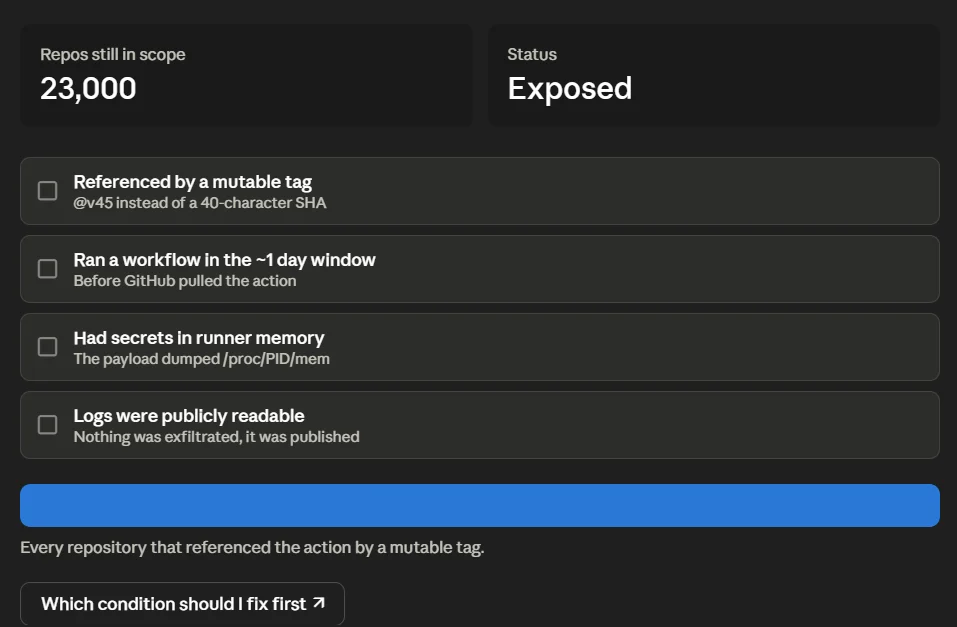
Roughly 23,000 repositories referenced the action.
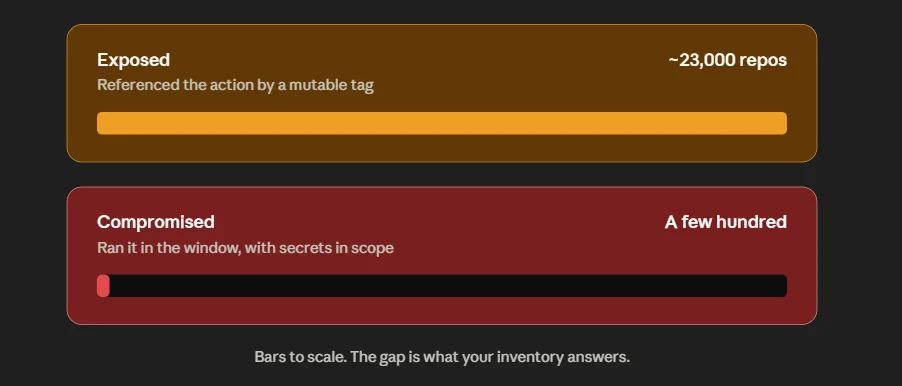
The number that actually leaked credentials was in the low hundreds — and the majority of those leaked short-lived GITHUB_TOKENs that expire the moment the job ends. A small subset leaked durable secrets: cloud keys, registry tokens, signing keys. Those were the real casualties.
Why the enormous gap? The malicious commit was live for roughly a day before GitHub pulled the action. To be compromised you had to run a workflow in that window, with secrets in memory, and (for the worst outcome) have public logs.
So there are two distinct populations:
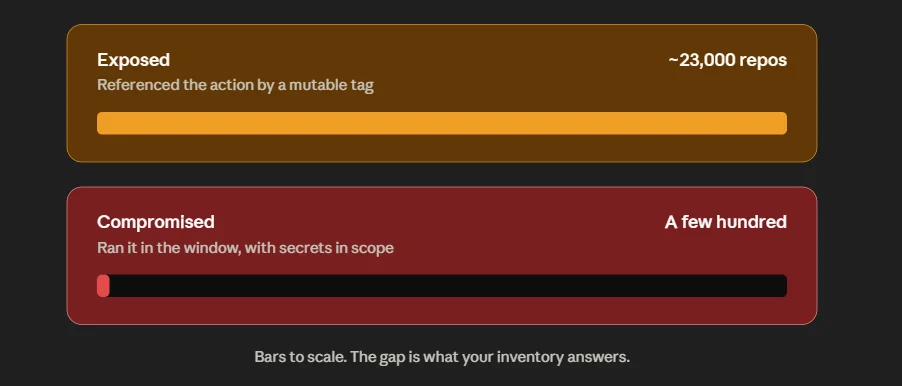
Everything that determined which side of that line you landed on was decided before the incident: whether you pinned to a SHA, whether your token was read-only, whether your cloud creds were long-lived, whether your logs were public.
And everything that determined how long your incident lasted was decided by one question: could you answer “which of my repositories referenced this, on which tags, in what window, and what secrets were in scope?” in minutes, or in days?
That is an inventory problem. Not a scanning problem.
The Loopholes That Made It Possible
1. Mutable version tags. A git tag is a movable label, not a fingerprint. @v45 is a promise, not a fact. Attackers repointed the tags and the version numbers never changed.
2. Over-privileged tokens. One PAT with write access across multiple organisations. The blast radius of a credential is defined at the moment you mint it, not at the moment it’s stolen.
3. pull_request_target handing secrets to untrusted code. The original sin, three hops upstream.
4. Audit gaps. Unit 42 noted that tag changes are not captured in GitHub’s audit log on the free tier. Attackers used forks and tag pushes to move quietly. Note carefully: this means “turn on audit logging” is not advice you can act on if you’re on a free plan. You compensate elsewhere.
5. Blind trust in third-party Actions. Most teams add uses: lines without reading a single line of what they’ve just agreed to execute. That trust is the attack surface.
Are you affected? Hunt for it now
If you have never checked, check. Copy-paste, adjust the org name.
Which repositories reference the action at all?
gh search code –owner YOUR_ORG “tj-actions/changed-files” –limit 200
Which reference it by a mutable tag — the ones that were exposed?
gh search code –owner YOUR_ORG “tj-actions/changed-files@v” –limit 200
Does the malicious commit appear anywhere in your history?
gh search code –owner YOUR_ORG “0e58ed8671d6b60d0890c21b07f8835ace038e67”
Grep your workflow logs for the payload’s output. The secrets were double-base64-encoded. Any JSON-shaped credential single-encodes to a string starting eyJ; double-encoded, that becomes ZXlK. Search retained workflow logs for ZXlK and for long unexplained base64 blobs.
Check runner egress. Any outbound connection from a build runner to gist.githubusercontent.com — or to any host that isn’t in your build’s expected dependency set — is the signal.
If you find anything, rotate in this order:
- Long-lived cloud credentials (AWS/GCP/Azure keys). These do not expire. They are the emergency.
- Registry and package tokens (npm, PyPI, container registries) — these let an attacker poison your downstream.
- Signing keys and private keys.
- GITHUB_TOKEN — self-expiring, lowest urgency.
Then hunt for persistence. In the incidents that followed tj-actions, attackers used stolen credentials to establish footholds after the theft: new deploy keys, new PATs, new org members, new webhooks, new workflow files. Audit all five.
Harden your pipeline this week
Pin to a full commit SHA. Not a tag.
# ❌ Mutable. A retag swaps the code out from under you.
– uses: tj-actions/changed-files@v45
# ✅ Immutable. A 40-character commit SHA cannot be repointed.
– uses: tj-actions/changed-files@a284dc1814e3fd07f2e34267fc8f81ea5486148c # v46.0.1
Two honest caveats, because pinning is necessary and not sufficient:
- A SHA pin freezes you out of security patches. Pair it with Dependabot or Renovate so the pins get bumped — and remember that Renovate is exactly the identity the attacker spoofed. Review the bot’s PRs like you’d review a human’s.
- Pinning protects you from a retag. It does not protect you from an Action whose own pipeline is compromised. That’s Act II. There is no pin that fixes that; only least privilege limits the damage.
Default every workflow token to read-only.
permissions:
contents: read # top of every workflow; escalate per-job only where genuinely needed
Kill long-lived cloud keys. Use OIDC federation. This is the structural fix for “live AWS keys in a public log” — if there is no static key in the secret store, there is nothing in the runner’s memory to dump.
permissions:
id-token: write
contents: read
steps:
– uses: aws-actions/configure-aws-credentials@<PINNED_SHA> # v4
with:
role-to-assume: arn:aws:iam::<ACCOUNT_ID>:role/gha-deploy
aws-region: me-central-1
Allowlist Actions at the organisation level. Settings → Actions → General → Allow specified actions and reusable workflows. Deny by default; add what you’ve reviewed.
Never use pull_request_target with a checkout of PR head code. If you need it, do not expose secrets to that job. This is the trigger that started the whole chain.
Monitor runner egress. Allowlist the hosts your build is supposed to reach. Everything else is an alert. This — not log review — is what actually caught tj-actions.
Use immutable tags and artifact attestations where your plan supports them. Build provenance turns “I think this is the right code” into something you can verify.
Why this keeps happening
tj-actions was not an outlier. It was an early entry in a pattern that has since industrialised.
Nx / s1ngularity (August 2025). Attackers exploited a workflow flaw to publish malicious package versions. The payload did something new: it hunted for locally installed AI coding assistants and used them to help enumerate secrets on developer machines. Stolen credentials were published to attacker-created public repositories.
Shai-Hulud (September 2025, and a much larger second wave in November 2025). The first genuinely self-replicating npm worm. It stole npm and GitHub credentials, published them publicly, then used the victim’s own npm token to poison further packages — automatically. Hundreds of packages in the second wave.
The through-line across all three:
- The CI/CD identity is the crown jewel. Not the code. The token.
- Automation is the propagation mechanism. The attacker writes the payload once. Your pipeline distributes it, at machine speed, on your behalf.
- Trust is transitive, and you cannot see past the first hop.
GitGuardian’s State of Secrets Sprawl 2026 counted 28.65 million leaked secrets, with AI-service keys up 81% year on year. The volume of credentials sitting in pipelines is going up, not down, and the attacks are getting faster at harvesting them.
Where the AppSec Teammate fits — and where it doesn’t
Let’s start with what isn’t true, because the industry has been sloppy about this.
Software composition analysis would not have caught tj-actions. SCA matches your dependencies against known vulnerabilities. On 14 March 2025 there was no known vulnerability — there was trusted code that had turned malicious an hour earlier. Any vendor telling you their SCA would have blocked this is describing a product that doesn’t exist.
Here is what actually shortens an incident like this, and how the AppSec Teammate is built to do it.
Blast radius as a query, not a fire drill. The Teammate maps every repository to its CI/CD path and the services it deploys to. So on the morning of a tj-actions event, “which of our 400 repos reference this action, on which tags, did they run in the window, and what secrets were in scope?” is a lookup — not three days of engineers grepping YAML.
Behavioural review of the diff, not signature-matching. The Teammate runs deterministic scanners and an LLM harness that reads code the way a reviewer would. Deterministic tools match what’s known. A reviewer notices that a build step decodes a blob and executes a script fetched from a remote gist — and flags it as anomalous, not as known-bad. That distinction is the entire game against a zero-day retag.
Evidence before escalation. Every finding is de-duplicated and proven exploitable — a real path from attacker-controlled input, a working proof of concept, an independent cross-check — before a human ever sees it. A pipeline that can’t do this will bury you in noise on the day you can least afford it.
Risk is multiplicative, not additive. CVE-2025-30066 landed on CISA’s Known Exploited Vulnerabilities catalogue, and that signal weighs heavily. But so does exposure. A poisoned action in a repo with no secrets and no deployment path scores near zero, no matter what the CVSS says. If reachability is near zero, so is your risk — and your engineers’ attention goes where it will actually matter.
Two human gates, and we mean it. In a supply chain event, the last thing you want is an autonomous agent confidently force-pushing a “fix” to four hundred repositories. Nothing significant ships without a person approving the action and a second check verifying the fix before it reaches production. Then an automated re-scan confirms the bug is actually gone — machine check and human check, not one instead of the other.
A risk record with a named owner and an SLA. So “rotate the npm token” doesn’t die in a Slack thread.
And what the red team learns, sticks. When our Red Teammate finds something the scanners missed, that miss becomes a permanent detection the scanner loads on its next run — not a one-off note in a report.
The honest limit: nobody detects a malicious commit as a known vulnerability, because at that moment it isn’t one. What actually shortens the incident is inventory, behavioural review, and the speed of your blast-radius answer. Runtime exposure mapping (tying a finding to the exact running service and its real reachability) is the hardest part of this problem and the part we’re investing in most heavily, because every downstream score depends on getting it right.
FAQs
What is a GitHub supply chain attack in simple terms?
An attacker poisons a shared tool that many teams already use, instead of breaking into each team one at a time. Your pipeline then pulls in the malicious code automatically, because it trusts that tool. Your own automation does the spreading.
Would a vulnerability scanner or SCA have caught tj-actions?
No. SCA compares your dependencies against a database of known vulnerabilities. This was previously-trusted code that turned malicious, with no CVE at the time it ran. What catches this class of attack is behavioural review of the change, least-privilege tokens that limit the damage, and monitoring of what your runners connect to.
How did the attack actually leak secrets?
The poisoned action dumped the build runner’s process memory into the workflow log, double-base64-encoded. It never sent anything to an attacker server — it simply published your secrets into your own logs and waited. On public repositories, anyone could read them.
Was my private repository at risk?
Lower risk, not no risk. The same memory dump happened; the log just wasn’t world-readable. If your logs are visible broadly inside your organisation, or you archive them as artefacts, or you use self-hosted runners, treat it as exposure. Check your logs and rotate anything that may have been in scope.
I pinned to @v45. Was I safe?
No. Every version tag was moved to point at the malicious commit. @v35, @v44, @v45 all resolved to the same poison. Only a full 40-character commit SHA was immune.
Does pinning to a SHA fully protect me?
It protects you from a retag, which is the specific vector here. It does not protect you from an Action whose own build pipeline is compromised — which is exactly how tj-actions itself was breached. Pinning is necessary. Least privilege, OIDC, and egress monitoring are what limit the damage when pinning isn’t enough.
How do I check whether I was affected?
Search your organisation for repositories referencing the action, grep retained workflow logs for ZXlK and unexplained base64 blobs, and check runner egress for calls to gist.githubusercontent.com. Then rotate long-lived cloud keys first, registry tokens second. See the hunting section above for the exact commands.